
WordPressの有料プラグインをGumroadで販売する場合、ライセンス認証の仕組みをどう作るかが課題になります。
この記事では、Gumroadで購入情報を検証し、自前のWordPress REST APIとMySQLで利用ドメインを記録する構成を扱います。掲載コードは認証処理を検討するための参考実装です。
ツールを販売できるGumroad(ガムロード)では購入したユーザーごとにライセンスキーが発行できます。
掲載コードには定期再認証の実行処理がありません。通信障害と無効キーの区別、同時登録時の上限保証、サイト所有確認なども実装が必要です。そのまま販売用の認証基盤として導入せず、以下の制約を確認してください。
別のライセンス管理サービスは使いませんが、Gumroadへの依存、販売手数料、サーバー代、保守作業は残ります。 Gumroad料金案内

この記事で扱う構成
- 購入者がGumroadで購入
- ライセンスキーが発行される
- プラグインをインストール → ライセンスキーを入力
- WordPress REST APIサーバーに送信
- Gumroad APIでライセンス検証 + MySQLにサイト登録
- 通常の逐次処理では最大3ドメインを想定(同時登録の排他制御は未実装)
- 有料機能が使えるようになる
技術スタック
- 販売プラットフォーム: Gumroad
- ライセンス検証: Gumroad License Verify API(検証リクエストにアクセストークンは不要)
- バックエンド: WordPress REST API(シンレンタルサーバー)
- データ保存: MySQL(WordPressのDB)
- クライアント: 販売プラグイン側PHP
それではやり方を詳しく解説します。
導入の流れ
購入・認証の流れは次のとおりです。設定画面を含む販売プラグイン全体は掲載していないため、以下だけでは動作する製品にはなりません。
Gumroadに商品を登録
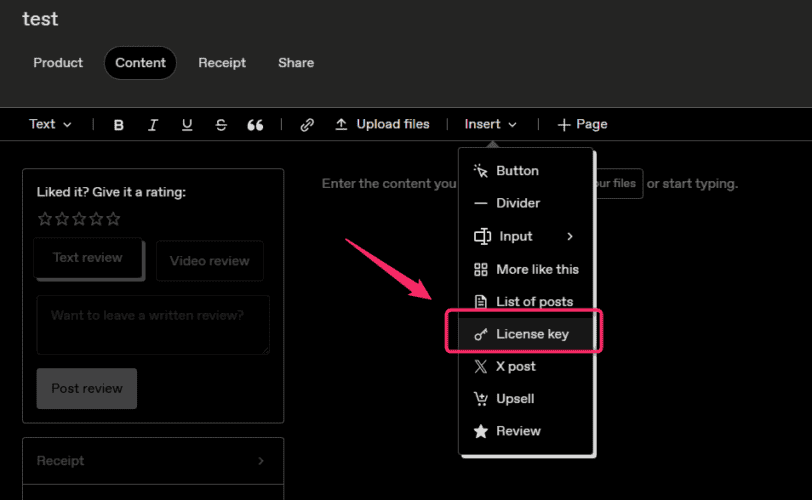
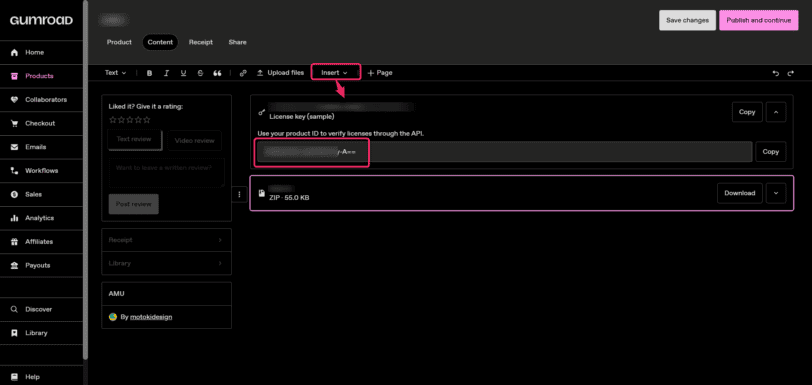
商品にライセンスキーの発行を設定し、商品編集画面に表示されるProduct IDを控えます。これは商品の識別子で、購入者のライセンスキーやAPIのアクセストークンとは異なります。
ライセンスサーバーの環境構築
サブドメイン等でライセンス認証用にWordPressサイトを立ち上げます。
掲載コードを使う場合は、先に検証用WordPressとデータベースのバックアップを用意します。コードの修正・テストを済ませてからプラグインとして組み込みます。
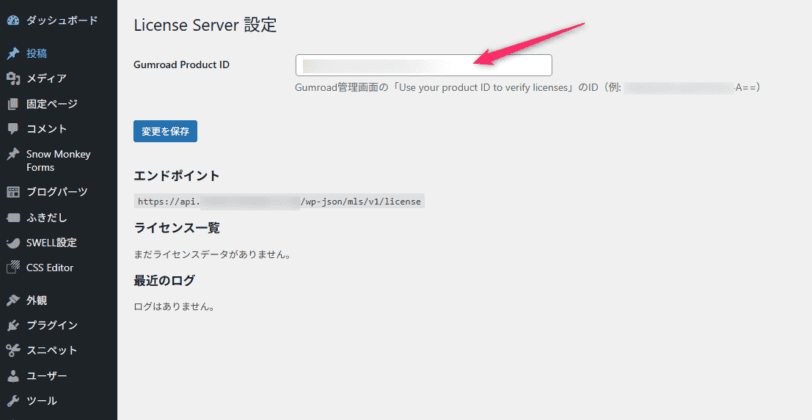
WordPressの管理画面>設定>License ServerからGumroad Product ID(xxxxxxxxxxxxxxxxxxx-X==)を登録して保存します。
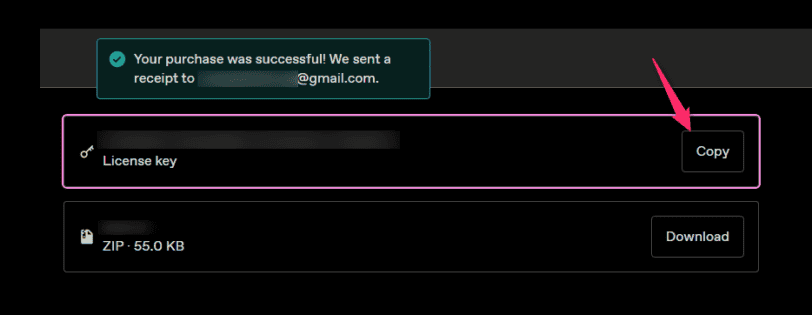
自作プラグインの購入
販売商品とは分けた検証用の商品と環境で、購入からキー発行までを確認します。
テストのために販売中の商品の価格を0円へ変更する手順は避け、Gumroadの購入テスト方法を確認してください。テスト購入のキーでAPI検証できる範囲も実際の応答で確認します。
発行されたライセンスキーは認証情報として扱い、公開記事・共有ログ・ソース管理へ記載しません。
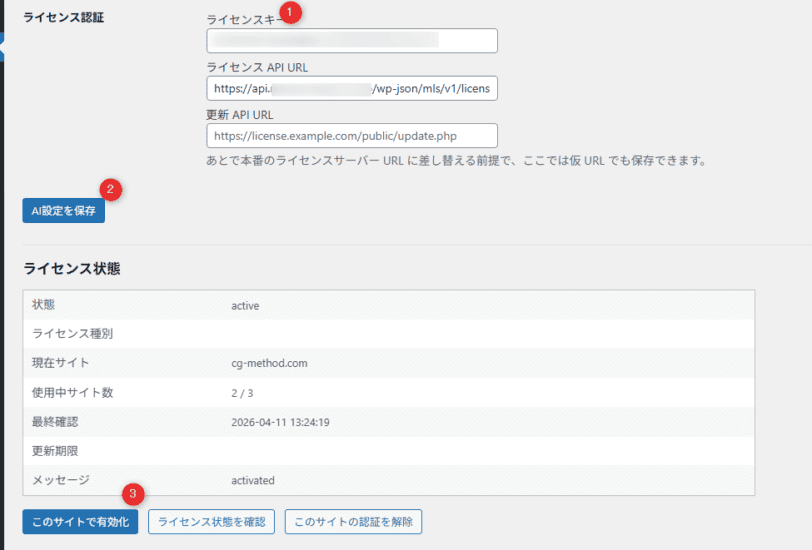
購入した自作プラグインを有効化。
自作プラグイン設定からライセンスキーを入れて保存。
最後にこのライセンスを有効化しましょう。
PHP、WordPress REST API、データベースの扱いを理解したうえで、後述の未実装部分を補って検証してください。
Gumroadの商品識別子と検証API
APIへ渡す商品の識別子と購入者のキーを区別します。
同じエラーメッセージでも、商品とキーの組み合わせの不一致など複数の原因があります。
Product IDと商品URLのスラッグは別の値
商品URLに使うスラッグと、APIのproduct_idに渡す商品識別子を区別してください。
| 名称 | 値の例 | 用途 |
|---|---|---|
| Permalink(URLスラッグ) | hogehoge | 商品URL用。product_idの代わりには入力しない |
| Product ID(API用) | xxxxxxxxxxxxxxxxxxx-X== | verify APIのproduct_idへ、管理画面の値を省略せず渡す |
Product IDの場所: 商品編集のコンテンツ画面にあるライセンスキーのブロックを確認します。画面上の配置は変更される場合があります。
URLのスラッグをproduct_idへ渡した場合や、別の商品に発行されたキーを送った場合は検証に失敗します。エラー文だけで原因を決めず、設定した商品IDと購入記録を照合します。
Product IDは表示された値全体をコピーします。例には末尾の等号が含まれていますが、文字列の見た目だけで正否を判定しません。2023年1月9日以降に作成された商品では、Gumroad公式案内はproduct_permalinkではなくproduct_idを要求しています。 Gumroad公式:License keys
Gumroad License Verify APIはAPIキー不要
以下のように、product_idとlicense_keyだけで検証できます。
curl -X POST https://api.gumroad.com/v2/licenses/verify \
  -d "product_id=xxxxxxxxxxxxxxxxxxx-X==" \
  -d "license_key=XXXX-XXXX-XXXX-XXXX" \
  -d "increment_uses_count=false"
increment_uses_count=false を指定することでGumroad側の使用カウントを増やさず、サイト数管理は自前で行います。
Step 1: ライセンスサーバー用WordPressを設置
サブドメインを追加してWordPressをインストール
レンタルサーバーの場合、管理パネルから api.example.com のようなサブドメインを追加し、WordPress簡単インストールでWordPressを入れます。
設定画面に表示されるライセンスAPIのURLを確認します。掲載プラグインはWordPressのrest_url()でURLを生成します。
パーマリンクを「投稿名」にすることはREST APIの必須条件ではありません。「基本」の場合は?rest_route=を含むURLになります。rest_no_routeでは、URL・POSTメソッド・ルート登録・プラグインの有効化状態を確認します。 WordPress公式:REST URL生成
ライセンスサーバープラグインをアップロード
以下の構成でプラグインファイルをアップロードします。
/wp-content/plugins/My-license-server/
    └── My-license-server.php
掲載プラグインの表示名は「Motoki License Server」です。有効化処理は次の3テーブルの作成を試みます。実際に作成されたか、データベースエラーがないかを検証環境で確認してください。表のwp_は例で、実際の接頭辞はサイトごとに異なります。
| テーブル名 | 用途 |
|---|---|
wp_mls_licenses | ライセンスキー管理(ハッシュ化して保存) |
wp_mls_activations | 有効化サイト管理 |
wp_mls_logs | デバッグ用ログ |
認証サーバー側ではキーをSHA-256のハッシュとして記録します。一方、掲載クライアントは販売プラグインの設定から平文キーを読み出します。両方のデータベースで平文を保存しない設計ではありません。
サーバー側にはキーの末尾4文字、購入者メールアドレス、購入IDなども記録します。データベース・バックアップ・通信ログの閲覧権限と保存期間を管理してください。末尾4文字は一意な識別子にはなりません。
Step 2: Gumroad Product IDをDBに登録
WordPress管理画面 → 設定 → License Server を開き、Gumroad Product IDに xxxxxxxxxxxxxxxxxxx-X==(==まで含む)を入力して保存します。
管理画面で設定を保存できない場合
options.phpへの保存リクエストのHTTP応答、管理者権限、nonce、設定登録、サーバーログを確認します。特定のセキュリティプラグインが原因とは、これだけでは断定できません。
原因を調べずにSQLで設定を上書きすると、誤ったデータベースの変更やオブジェクトキャッシュとの不整合につながります。WP-CLIが使える環境では、対象WordPressのディレクトリとURLを確認して設定を更新できます。
以下はWP-CLIでの設定例です。URLとProduct IDを実際の値へ置き換えます。認証サーバー側のProduct IDを必ず設定し、リクエスト側の商品指定に依存させないでください。
wp option update mls_product_id "YOUR_PRODUCT_ID" --url="https://api.example.com"データベースを読み取って確認する場合の例です。wp_は実際の接頭辞へ置き換えます。
SELECT option_name, option_value FROM wp_options
WHERE option_name = 'mls_product_id';
Step 3: 動作確認(curl)
Windowsのコマンドプロンプトでの例
Windowsのコマンドプロンプトはバックスラッシュ \ による改行ができません。
次はcmd.exe向けの引用符を使った例です。PowerShellへそのまま流用せず、JSONファイルを渡す方法など使用シェルに合う書式にします。URLは設定画面に表示されたものへ置き換え、検証専用のキーとドメインを使ってください。実行はサイト登録を伴います。
curl -X POST https://api.example.com/wp-json/mls/v1/license -H "Content-Type: application/json" -d "{\"action\":\"activate\",\"license_key\":\"XXXX-XXXX-XXXX-XXXX\",\"site_url\":\"https://test.example.com\",\"product_id\":\"xxxxxxxxxxxxxxxxxxx-X==\",\"plugin_version\":\"1.0.0\"}"期待するレスポンス
{
  "ok": true,
  "status": "active",
  "message": "activated",
  "site_count": 1,
  "max_sites": 3,
  "domain": "test.example.com"
}
Mac / Linuxの場合
curl -X POST https://api.example.com/wp-json/mls/v1/license \
  -H "Content-Type: application/json" \
  -d '{
    "action": "activate",
    "license_key": "XXXX-XXXX-XXXX-XXXX",
    "site_url": "https://test.example.com",
    "product_id": "xxxxxxxxxxxxxxxxxxx-X==",
    "plugin_version": "1.0.0"
  }'
Step 4: 販売プラグインへの組み込み
ライセンスAPIのURLをデフォルト値として埋め込む
設定画面への初期表示の例です。これだけでは未保存時のAPI呼び出し先は変わりません。掲載クライアントのamu_ai_license_get_api_url()も同じ既定値を使う設計にするか、利用開始前に設定を保存してください。
// 変更前
value="<?php echo esc_attr((string) ($settings['license_api_url'] ?? '')); ?>"

// 変更後(?: でフォールバック)
value="<?php echo esc_attr((string) (($settings['license_api_url'] ?? '')
    ?: 'https://api.example.com/wp-json/mls/v1/license')); ?>"
有料機能をライセンスでガードする
認証していない場合に機能を止めるには、AJAXハンドラの共通バリデーション関数にチェックを追加します。
function amu_ai_validate_rewrite_request(): void
{
    check_ajax_referer('amu_ai_rewriter', 'nonce');

    // ライセンスチェックを追加
    if ( ! function_exists('amu_ai_license_is_recently_valid')
         || ! amu_ai_license_is_recently_valid() ) {
        wp_send_json_error( [
            'message' => 'ライセンスが有効ではありません。ライセンス設定を確認してください。'
        ], 403 );
    }

    // 以下は既存のコード
    $post_id = isset($_POST['postId']) ? (int) $_POST['postId'] : 0;
    if ($post_id <= 0 || ! current_user_can('edit_post', $post_id)) {
        wp_send_json_error(['message' => 'Permission denied.'], 403);
    }
}
この関数を通る処理だけが対象です。別のAJAX・REST・管理画面・バッチ処理から有料機能を呼べる場合は、各入口の権限チェックと認証判定を確認してください。購入者が変更できるPHPコードだけで改変を完全に防ぐことはできません。
ZIPをパッケージする際の注意
ZIP内のエントリー名にバックスラッシュが使われている場合、Linux側の展開で問題が起こることがあります。Windowsで作ったZIPすべてに起こるわけではありません。先にアーカイブ内のパスと展開結果を確認します。
次は、自分で作成したZIPの区切り文字を修正する例です。変換後に同名パスの重複がないか確認し、PHPファイルやフォルダーが意図した構造になるか検証します。
import zipfile

with zipfile.ZipFile('original.zip') as zin, \
     zipfile.ZipFile('fixed.zip', 'w', zipfile.ZIP_DEFLATED) as zout:
    for item in zin.infolist():
        new_name = item.filename.replace('\\', '/')  # バックスラッシュを修正
        zout.writestr(new_name, zin.read(item.filename))
ライセンスサーバーの仕組み
API仕様
1つのRESTルートで3つの操作を受け付け、actionで分岐します。掲載例のパスはPOST /wp-json/mls/v1/licenseですが、実際のURLはWordPressの設定に従います。
| action | 処理 |
|---|---|
activate | ライセンス検証とドメイン登録(3件上限を逐次判定) |
validate | 呼び出された時点で有効性を確認。定期実行処理は含まない |
deactivate | サイトの解除(別サイトへ移行可能) |
ライセンス認証の流れ
- クライアントがライセンスキー+サイトURLを送信
- サーバーがGumroad APIでライセンス検証
- 検証応答の返金・紛争・チャージバック状態を判定(即時通知ではない)
- 有効なら
wp_mls_activationsにサイトを登録 - 登録前の件数が上限なら
limit_exceededを返す。同時リクエストの排他制御は別途必要
保存した認証状態と再検証の制約
クライアントは認証結果をWordPressのオプションへ保存します。掲載コードの動作は次のとおりで、「24時間ごとに自動再認証する実装」ではありません。
- 再検証の起点: 掲載されているのは管理画面の操作を受けるハンドラーです。バックグラウンドで24時間ごとに実行する処理は未掲載です。
- 有効性の判定: 保存状態がactiveで、最終確認から7日以内かを調べます。ただしローカル日時の保存とstrtotime・timeの組み合わせにはタイムゾーンのずれがあり、UTCの整数時刻へ統一するなどの修正が必要です。
- 通信障害: クライアントから認証サーバーへの通信失敗では以前の状態を保持します。一方、認証サーバーからGumroadへの通信失敗は無効キーと同じ結果になり、validateで利用を止める場合があります。全ての障害で7日間の猶予を保証するコードではありません。
ライセンス管理(運営者向け)
ライセンスの対象レコードを確認して失効させる
-- バックアップ後に対象を読み取り、購入記録と照合する。末尾4文字だけでは特定しない。
SELECT id, product_id, license_key_hash, license_key_last4, status
FROM wp_mls_licenses WHERE id = 0;

-- 0と識別子を、確認した対象の値へ置き換える。0のままでは対象なし。
UPDATE wp_mls_licenses SET status = 'revoked'
WHERE id = 0 AND product_id = 'CONFIRMED_PRODUCT_ID'
  AND license_key_hash = 'CONFIRMED_SHA256';
特定ライセンスのサイト登録を解除する
-- wp_は実際の接頭辞へ変更。購入記録・キーのハッシュ・ドメインを照合する。
SELECT id, license_key_hash, domain, status
FROM wp_mls_activations WHERE id = 0;

-- 0と識別子を、確認した1件の値へ置き換える。
UPDATE wp_mls_activations
SET status = 'inactive', deactivated_at = NOW()
WHERE id = 0 AND license_key_hash = 'CONFIRMED_SHA256'
  AND domain = 'confirmed.example.com';
返金対応について
サーバーがGumroadへ照会した時点で、返金などのフラグを判定します。クライアントの保存状態には直ちに反映されず、掲載コードにはWebhook受信処理もありません。
定期再検証、通信障害時の扱い、失効後の解除操作や問い合わせ対応を設計してください。サブスクリプションの終了日時を判定する処理も掲載コードには含まれません。
返金条件は販売内容とGumroadの規約を確認して案内します。デジタル商品であることだけを理由に、一律の返金不可を推奨することはできません。
「No refunds」を設定していてもGumroad側で返金される場合があります。設定だけで返金を防ぐ前提の認証設計にはしないでください。 Gumroad公式:返金ポリシー
トラブルシューティング
| エラー | 原因 | 対処 |
|---|---|---|
rest_no_route | URL・メソッド・ルート登録・有効化状態などの不一致 | 設定画面のAPI URLとPOSTで確認。「投稿名」は必須ではない |
That license does not exist for the provided product. | 商品IDとキーの組み合わせが一致しないなど | 商品編集画面のProduct IDと購入記録を照合 |
License API response was invalid. | JSONでない応答、HTTPエラー、プロキシ・WAFなど | HTTP状態と応答形式を確認。キーを含む詳細ログは共有しない |
| 管理画面の設定が保存されない | 権限・nonce・設定登録・WAF等を切り分ける必要がある | 保存リクエストとログを確認。原因不明のままSQLで上書きしない |
| ZIPインストール後にエラー | ZIP構造、必要ファイル、PHP互換性など | エラーとZIP内パスを確認し、該当原因だけ修正 |
参考コードと導入前に必要な修正
このコードは本番運用を保証する完成版ではありません。サーバーのProduct IDが空のときリクエスト側の値を採用する設計は、設定不備時に別商品を受け付ける原因になります。サーバー設定を必須とし、不備があれば拒否する実装が必要です。配列など不正な型の入力、URL形式・長さ、APIの呼び出し頻度も制限してください。
3件上限にはライセンス単位のロックなどの排他制御とDBエラー処理が必要です。site_urlは自己申告で所有確認をしていません。さらに定期実行、通信エラーと無効キーの区別、UTC時刻への統一、サブスクリプション状態の判定、成功・失敗通知の出し分けを実装してテストします。次のサーバー・クライアント本体は、これらが未対応の参考コードとして掲載しています。
ライセンスサーバー用プラグイン
<?php
/**
 * Plugin Name: Motoki License Server
 * Description: Gumroad連携WordPress有料プラグイン用ライセンス管理サーバー
 * Version: 1.0.0
 * Author: MOTOKI合同会社
 */

defined( 'ABSPATH' ) || exit;

define( 'MLS_VERSION', '1.0.0' );
define( 'MLS_PLUGIN_DIR', plugin_dir_path( __FILE__ ) );

// ─────────────────────────────────────────────
// 有効化時: テーブル作成
// ─────────────────────────────────────────────
register_activation_hook( __FILE__, 'mls_activate' );
function mls_activate() {
    mls_create_tables();
}

function mls_create_tables() {
    global $wpdb;
    $charset = $wpdb->get_charset_collate();

    // licenses テーブル
    $sql_licenses = "CREATE TABLE IF NOT EXISTS {$wpdb->prefix}mls_licenses (
        id              BIGINT UNSIGNED NOT NULL AUTO_INCREMENT,
        license_key_hash VARCHAR(64)  NOT NULL,
        license_key_last4 CHAR(4)     NOT NULL,
        product_id      VARCHAR(100)  NOT NULL,
        status          ENUM('active','revoked','invalid') NOT NULL DEFAULT 'active',
        max_sites       TINYINT UNSIGNED NOT NULL DEFAULT 3,
        gumroad_email   VARCHAR(255)  NOT NULL DEFAULT '',
        gumroad_purchase_id VARCHAR(100) NOT NULL DEFAULT '',
        created_at      DATETIME      NOT NULL,
        updated_at      DATETIME      NOT NULL,
        last_verified_at DATETIME     NULL,
        PRIMARY KEY (id),
        UNIQUE KEY uq_hash_product (license_key_hash, product_id),
        KEY idx_hash (license_key_hash)
    ) $charset;";

    // activations テーブル
    $sql_activations = "CREATE TABLE IF NOT EXISTS {$wpdb->prefix}mls_activations (
        id              BIGINT UNSIGNED NOT NULL AUTO_INCREMENT,
        license_key_hash VARCHAR(64)  NOT NULL,
        site_hash       VARCHAR(64)   NOT NULL,
        domain          VARCHAR(255)  NOT NULL,
        normalized_site VARCHAR(255)  NOT NULL,
        status          ENUM('active','inactive') NOT NULL DEFAULT 'active',
        activated_at    DATETIME      NOT NULL,
        deactivated_at  DATETIME      NULL,
        last_seen_at    DATETIME      NOT NULL,
        PRIMARY KEY (id),
        UNIQUE KEY uq_license_site (license_key_hash, site_hash),
        KEY idx_license (license_key_hash)
    ) $charset;";

    // logs テーブル
    $sql_logs = "CREATE TABLE IF NOT EXISTS {$wpdb->prefix}mls_logs (
        id              BIGINT UNSIGNED NOT NULL AUTO_INCREMENT,
        timestamp       DATETIME      NOT NULL,
        action          VARCHAR(20)   NOT NULL,
        license_key_last4 CHAR(4)    NOT NULL DEFAULT '',
        domain          VARCHAR(255)  NOT NULL DEFAULT '',
        result          VARCHAR(20)   NOT NULL,
        message         TEXT          NOT NULL,
        PRIMARY KEY (id),
        KEY idx_timestamp (timestamp)
    ) $charset;";

    require_once ABSPATH . 'wp-admin/includes/upgrade.php';
    dbDelta( $sql_licenses );
    dbDelta( $sql_activations );
    dbDelta( $sql_logs );
}

// ─────────────────────────────────────────────
// REST API 登録
// ─────────────────────────────────────────────
add_action( 'rest_api_init', 'mls_register_routes' );
function mls_register_routes() {
    register_rest_route( 'mls/v1', '/license', [
        'methods'             => 'POST',
        'callback'            => 'mls_handle_request',
        'permission_callback' => '__return_true', // 認証はアプリ側で行う
    ] );
}

// ─────────────────────────────────────────────
// メインハンドラ
// ─────────────────────────────────────────────
function mls_handle_request( WP_REST_Request $request ) {
    $body = $request->get_json_params();
    if ( empty( $body ) ) {
        // form-urlencoded フォールバック
        $body = $request->get_params();
    }

    $action = sanitize_text_field( $body['action'] ?? '' );

    switch ( $action ) {
        case 'activate':
            return mls_action_activate( $body );
        case 'validate':
            return mls_action_validate( $body );
        case 'deactivate':
            return mls_action_deactivate( $body );
        default:
            return mls_json_error( 'invalid_action', '不正なアクションです', 400 );
    }
}

// ─────────────────────────────────────────────
// activate
// ─────────────────────────────────────────────
function mls_action_activate( array $body ) {
    // バリデーション
    $v = mls_validate_input( $body, [ 'license_key', 'site_url' ] );
    if ( is_wp_error( $v ) ) {
        return mls_json_error( 'validation_error', $v->get_error_message(), 400 );
    }

    $license_key = $body['license_key'];
    $product_id  = mls_get_product_id( $body );
    $site_url    = $body['site_url'];

    $normalized  = mls_normalize_site_url( $site_url );
    $key_hash    = mls_sha256( $license_key );
    $site_hash   = mls_sha256( $normalized );
    $key_last4   = substr( $license_key, -4 );

    // Gumroad verify
    $gumroad = mls_verify_gumroad( $license_key, $product_id );
    if ( ! $gumroad['valid'] ) {
        mls_write_log( 'activate', $key_last4, $normalized, 'fail', 'Gumroad invalid: ' . $gumroad['reason'] );
        return mls_json_error( 'license_invalid', 'ライセンスが無効です', 403 );
    }

    global $wpdb;
    $now = current_time( 'mysql' );

    // licenses upsert
    $license = mls_find_license( $key_hash, $product_id );
    if ( ! $license ) {
        $wpdb->insert( $wpdb->prefix . 'mls_licenses', [
            'license_key_hash'    => $key_hash,
            'license_key_last4'   => $key_last4,
            'product_id'          => $product_id,
            'status'              => 'active',
            'max_sites'           => 3,
            'gumroad_email'       => $gumroad['email'],
            'gumroad_purchase_id' => $gumroad['purchase_id'],
            'created_at'          => $now,
            'updated_at'          => $now,
            'last_verified_at'    => $now,
        ] );
        $license = mls_find_license( $key_hash, $product_id );
    } else {
        // revoked チェック
        if ( $license->status === 'revoked' ) {
            mls_write_log( 'activate', $key_last4, $normalized, 'fail', 'License revoked' );
            return mls_json_error( 'license_revoked', 'このライセンスは無効化されています', 403 );
        }
        // last_verified_at 更新
        $wpdb->update(
            $wpdb->prefix . 'mls_licenses',
            [ 'last_verified_at' => $now, 'updated_at' => $now, 'gumroad_email' => $gumroad['email'] ],
            [ 'id' => $license->id ]
        );
    }

    $max_sites = (int) $license->max_sites;

    // 同一サイトが既にアクティブ → 冪等成功
    $existing = mls_find_active_activation( $key_hash, $site_hash );
    if ( $existing ) {
        $wpdb->update(
            $wpdb->prefix . 'mls_activations',
            [ 'last_seen_at' => $now ],
            [ 'id' => $existing->id ]
        );
        $count = mls_count_active_activations( $key_hash );
        mls_write_log( 'activate', $key_last4, $normalized, 'ok', 'Already active (idempotent)' );
        return rest_ensure_response( [
            'ok'        => true,
            'status'    => 'active',
            'message'   => 'already_active',
            'site_count' => $count,
            'max_sites' => $max_sites,
            'domain'    => $normalized,
        ] );
    }

    // 使用数チェック
    $count = mls_count_active_activations( $key_hash );
    if ( $count >= $max_sites ) {
        mls_write_log( 'activate', $key_last4, $normalized, 'fail', "Limit exceeded: {$count}/{$max_sites}" );
        return rest_ensure_response( [
            'ok'        => false,
            'status'    => 'limit_exceeded',
            'message'   => '有効化できるサイト数の上限に達しています',
            'site_count' => $count,
            'max_sites' => $max_sites,
        ] );
    }

    // activation 作成(UPSERT: inactive行があれば再active化)
    $row = $wpdb->get_row( $wpdb->prepare(
        "SELECT * FROM {$wpdb->prefix}mls_activations WHERE license_key_hash=%s AND site_hash=%s",
        $key_hash, $site_hash
    ) );

    if ( $row ) {
        $wpdb->update(
            $wpdb->prefix . 'mls_activations',
            [ 'status' => 'active', 'activated_at' => $now, 'deactivated_at' => null, 'last_seen_at' => $now, 'domain' => $normalized ],
            [ 'id' => $row->id ]
        );
    } else {
        $wpdb->insert( $wpdb->prefix . 'mls_activations', [
            'license_key_hash' => $key_hash,
            'site_hash'        => $site_hash,
            'domain'           => $normalized,
            'normalized_site'  => $normalized,
            'status'           => 'active',
            'activated_at'     => $now,
            'deactivated_at'   => null,
            'last_seen_at'     => $now,
        ] );
    }

    $count = mls_count_active_activations( $key_hash );
    mls_write_log( 'activate', $key_last4, $normalized, 'ok', "Activated. {$count}/{$max_sites}" );

    return rest_ensure_response( [
        'ok'        => true,
        'status'    => 'active',
        'message'   => 'activated',
        'site_count' => $count,
        'max_sites' => $max_sites,
        'domain'    => $normalized,
    ] );
}

// ─────────────────────────────────────────────
// validate
// ─────────────────────────────────────────────
function mls_action_validate( array $body ) {
    $v = mls_validate_input( $body, [ 'license_key', 'site_url' ] );
    if ( is_wp_error( $v ) ) {
        return mls_json_error( 'validation_error', $v->get_error_message(), 400 );
    }

    $license_key = $body['license_key'];
    $product_id  = mls_get_product_id( $body );
    $site_url    = $body['site_url'];

    $normalized = mls_normalize_site_url( $site_url );
    $key_hash   = mls_sha256( $license_key );
    $site_hash  = mls_sha256( $normalized );
    $key_last4  = substr( $license_key, -4 );

    // Gumroad verify
    $gumroad = mls_verify_gumroad( $license_key, $product_id );
    if ( ! $gumroad['valid'] ) {
        mls_write_log( 'validate', $key_last4, $normalized, 'fail', 'Gumroad invalid: ' . $gumroad['reason'] );
        return rest_ensure_response( [
            'ok'     => true,
            'valid'  => false,
            'status' => 'license_invalid',
        ] );
    }

    // ライセンス行チェック
    $license = mls_find_license( $key_hash, $product_id );
    if ( ! $license || $license->status === 'revoked' ) {
        mls_write_log( 'validate', $key_last4, $normalized, 'fail', 'License not found or revoked' );
        return rest_ensure_response( [
            'ok'     => true,
            'valid'  => false,
            'status' => 'license_revoked',
        ] );
    }

    $max_sites = (int) $license->max_sites;
    $count     = mls_count_active_activations( $key_hash );

    // last_verified_at 更新
    global $wpdb;
    $now = current_time( 'mysql' );
    $wpdb->update(
        $wpdb->prefix . 'mls_licenses',
        [ 'last_verified_at' => $now, 'updated_at' => $now ],
        [ 'id' => $license->id ]
    );

    // activation チェック
    $activation = mls_find_active_activation( $key_hash, $site_hash );
    if ( $activation ) {
        $wpdb->update(
            $wpdb->prefix . 'mls_activations',
            [ 'last_seen_at' => $now ],
            [ 'id' => $activation->id ]
        );
        mls_write_log( 'validate', $key_last4, $normalized, 'ok', 'Valid' );
        return rest_ensure_response( [
            'ok'        => true,
            'valid'     => true,
            'status'    => 'active',
            'site_count' => $count,
            'max_sites' => $max_sites,
            'domain'    => $normalized,
        ] );
    }

    mls_write_log( 'validate', $key_last4, $normalized, 'fail', 'Not activated for this site' );
    return rest_ensure_response( [
        'ok'        => true,
        'valid'     => false,
        'status'    => 'not_activated_for_this_site',
        'site_count' => $count,
        'max_sites' => $max_sites,
    ] );
}

// ─────────────────────────────────────────────
// deactivate
// ─────────────────────────────────────────────
function mls_action_deactivate( array $body ) {
    $v = mls_validate_input( $body, [ 'license_key', 'site_url' ] );
    if ( is_wp_error( $v ) ) {
        return mls_json_error( 'validation_error', $v->get_error_message(), 400 );
    }

    $license_key = $body['license_key'];
    $product_id  = mls_get_product_id( $body );
    $site_url    = $body['site_url'];

    $normalized = mls_normalize_site_url( $site_url );
    $key_hash   = mls_sha256( $license_key );
    $site_hash  = mls_sha256( $normalized );
    $key_last4  = substr( $license_key, -4 );

    // Gumroad verify(解除時も確認)
    $gumroad = mls_verify_gumroad( $license_key, $product_id );
    if ( ! $gumroad['valid'] ) {
        mls_write_log( 'deactivate', $key_last4, $normalized, 'fail', 'Gumroad invalid' );
        return mls_json_error( 'license_invalid', 'ライセンスが無効です', 403 );
    }

    global $wpdb;
    $now = current_time( 'mysql' );

    $activation = mls_find_active_activation( $key_hash, $site_hash );
    if ( $activation ) {
        $wpdb->update(
            $wpdb->prefix . 'mls_activations',
            [ 'status' => 'inactive', 'deactivated_at' => $now ],
            [ 'id' => $activation->id ]
        );
    }

    $count = mls_count_active_activations( $key_hash );
    $license = mls_find_license( $key_hash, $product_id );
    $max_sites = $license ? (int) $license->max_sites : 3;

    mls_write_log( 'deactivate', $key_last4, $normalized, 'ok', "Deactivated. remaining: {$count}/{$max_sites}" );

    return rest_ensure_response( [
        'ok'        => true,
        'status'    => 'deactivated',
        'site_count' => $count,
        'max_sites' => $max_sites,
    ] );
}

// ─────────────────────────────────────────────
// Gumroad verify
// ─────────────────────────────────────────────
function mls_verify_gumroad( string $license_key, string $product_id ): array {
    // Gumroad verify APIに product_id(Base64形式)を送る。APIキー不要。
    $response = wp_remote_post( 'https://api.gumroad.com/v2/licenses/verify', [
        'timeout' => 10,
        'body'    => [
            'product_id'           => $product_id,
            'license_key'          => $license_key,
            'increment_uses_count' => 'false',
        ],
    ] );

    if ( is_wp_error( $response ) ) {
        return [ 'valid' => false, 'reason' => 'network_error', 'email' => '', 'purchase_id' => '' ];
    }

    $code = wp_remote_retrieve_response_code( $response );
    $data = json_decode( wp_remote_retrieve_body( $response ), true );

    if ( $code !== 200 || empty( $data['success'] ) ) {
        $reason = $data['message'] ?? 'invalid';
        return [ 'valid' => false, 'reason' => $reason, 'email' => '', 'purchase_id' => '' ];
    }

    $purchase = $data['purchase'] ?? [];

    // 返金・紛争チェック
    if ( ! empty( $purchase['refunded'] ) || ! empty( $purchase['disputed'] ) || ! empty( $purchase['chargebacked'] ) ) {
        return [ 'valid' => false, 'reason' => 'refunded_or_disputed', 'email' => '', 'purchase_id' => '' ];
    }

    return [
        'valid'       => true,
        'reason'      => '',
        'email'       => sanitize_email( $purchase['email'] ?? '' ),
        'purchase_id' => sanitize_text_field( $purchase['id'] ?? $purchase['sale_id'] ?? '' ),
    ];
}

// ─────────────────────────────────────────────
// ユーティリティ関数
// ─────────────────────────────────────────────

/** site_url を正規化する */
function mls_normalize_site_url( string $url ): string {
    $url = strtolower( trim( $url ) );
    // schemeがなければ付加してparse_urlを通す
    if ( ! preg_match( '#^https?://#', $url ) ) {
        $url = 'https://' . $url;
    }
    $parsed = parse_url( $url );
    $host   = $parsed['host'] ?? $url;
    // www. 除去
    $host   = preg_replace( '/^www\./', '', $host );
    return $host;
}

/** SHA-256ハッシュ */
function mls_sha256( string $value ): string {
    return hash( 'sha256', $value );
}

/** ライセンス行取得 */
function mls_find_license( string $key_hash, string $product_id ) {
    global $wpdb;
    return $wpdb->get_row( $wpdb->prepare(
        "SELECT * FROM {$wpdb->prefix}mls_licenses WHERE license_key_hash=%s AND product_id=%s LIMIT 1",
        $key_hash, $product_id
    ) );
}

/** アクティブなactivation行取得 */
function mls_find_active_activation( string $key_hash, string $site_hash ) {
    global $wpdb;
    return $wpdb->get_row( $wpdb->prepare(
        "SELECT * FROM {$wpdb->prefix}mls_activations WHERE license_key_hash=%s AND site_hash=%s AND status='active' LIMIT 1",
        $key_hash, $site_hash
    ) );
}

/** アクティブなactivation数 */
function mls_count_active_activations( string $key_hash ): int {
    global $wpdb;
    return (int) $wpdb->get_var( $wpdb->prepare(
        "SELECT COUNT(*) FROM {$wpdb->prefix}mls_activations WHERE license_key_hash=%s AND status='active'",
        $key_hash
    ) );
}

/** ログ書き込み */
function mls_write_log( string $action, string $key_last4, string $domain, string $result, string $message ) {
    global $wpdb;
    $wpdb->insert( $wpdb->prefix . 'mls_logs', [
        'timestamp'         => current_time( 'mysql' ),
        'action'            => $action,
        'license_key_last4' => $key_last4,
        'domain'            => $domain,
        'result'            => $result,
        'message'           => $message,
    ] );

    // ログが10000行を超えたら古い行を削除
    $count = (int) $wpdb->get_var( "SELECT COUNT(*) FROM {$wpdb->prefix}mls_logs" );
    if ( $count > 10000 ) {
        $wpdb->query( "DELETE FROM {$wpdb->prefix}mls_logs ORDER BY id ASC LIMIT 1000" );
    }
}

/** 入力バリデーション */
function mls_validate_input( array $body, array $required_keys ) {
    // product_slug → product_id へ正規化(amu-ai-publisher クライアント対応)
    if ( empty( $body['product_id'] ) && ! empty( $body['product_slug'] ) ) {
        $body['product_id'] = $body['product_slug'];
    }

    foreach ( $required_keys as $key ) {
        if ( empty( $body[ $key ] ) ) {
            return new WP_Error( 'missing_field', "必須パラメータが不足しています: {$key}" );
        }
    }

    // product_idの照合はGumroad verifyに任せるためここではチェックしない
    return true;
}

/** Gumroad verify用のproduct_idを取得(DB設定値を優先) */
function mls_get_product_id( array $body ): string {
    // DBに設定されたProduct IDを優先(Gumroad verify用)
    $configured = get_option( 'mls_product_id', '' );
    if ( $configured ) {
        return trim( $configured );
    }
    // フォールバック: リクエストのproduct_id or product_slug
    if ( ! empty( $body['product_id'] ) ) {
        return sanitize_text_field( $body['product_id'] );
    }
    return sanitize_text_field( $body['product_slug'] ?? '' );
}

/** エラーレスポンス */
function mls_json_error( string $code, string $message, int $status = 400 ) {
    return new WP_REST_Response( [
        'ok'      => false,
        'status'  => $code,
        'message' => $message,
    ], $status );
}

// ─────────────────────────────────────────────
// 管理画面: 設定ページ
// ─────────────────────────────────────────────
add_action( 'admin_menu', 'mls_admin_menu' );
function mls_admin_menu() {
    add_options_page(
        'License Server 設定',
        'License Server',
        'manage_options',
        'mls-settings',
        'mls_settings_page'
    );
}

add_action( 'admin_init', 'mls_register_settings' );
function mls_register_settings() {
    register_setting( 'mls_options', 'mls_product_id', [
        'sanitize_callback' => function( $val ) { return trim( (string) $val ); },
    ] );
}

function mls_settings_page() {
    global $wpdb;
    ?>
    <div class="wrap">
        <h1>License Server 設定</h1>
        <form method="post" action="options.php">
            <?php settings_fields( 'mls_options' ); ?>
            <table class="form-table">
                <tr>
                    <th>Gumroad Product ID</th>
                    <td>
                        <input type="text" name="mls_product_id"
                            value="<?php echo esc_attr( get_option( 'mls_product_id' ) ); ?>"
                            class="regular-text" />
                        <p class="description">Gumroad管理画面の「Use your product ID to verify licenses」のID(例: xxxxxxxxxxxxxxxxxxx-X==)</p>
                    </td>
                </tr>
            </table>
            <?php submit_button(); ?>
        </form>

        <h2>エンドポイント</h2>
        <code><?php echo esc_url( rest_url( 'mls/v1/license' ) ); ?></code>

        <h2>ライセンス一覧</h2>
        <?php
        $licenses = $wpdb->get_results( "SELECT * FROM {$wpdb->prefix}mls_licenses ORDER BY created_at DESC LIMIT 50" );
        if ( $licenses ) :
        ?>
        <table class="wp-list-table widefat striped">
            <thead><tr>
                <th>Key末尾4桁</th><th>Product ID</th><th>Status</th>
                <th>Email</th><th>使用数/上限</th><th>最終確認</th>
            </tr></thead>
            <tbody>
            <?php foreach ( $licenses as $lic ) :
                $count = mls_count_active_activations( $lic->license_key_hash );
            ?>
                <tr>
                    <td>****<?php echo esc_html( $lic->license_key_last4 ); ?></td>
                    <td><?php echo esc_html( $lic->product_id ); ?></td>
                    <td><?php echo esc_html( $lic->status ); ?></td>
                    <td><?php echo esc_html( $lic->gumroad_email ); ?></td>
                    <td><?php echo esc_html( $count . '/' . $lic->max_sites ); ?></td>
                    <td><?php echo esc_html( $lic->last_verified_at ); ?></td>
                </tr>
            <?php endforeach; ?>
            </tbody>
        </table>
        <?php else : ?>
        <p>まだライセンスデータがありません。</p>
        <?php endif; ?>

        <h2>最近のログ</h2>
        <?php
        $logs = $wpdb->get_results( "SELECT * FROM {$wpdb->prefix}mls_logs ORDER BY id DESC LIMIT 50" );
        if ( $logs ) :
        ?>
        <table class="wp-list-table widefat striped">
            <thead><tr>
                <th>日時</th><th>Action</th><th>Key末尾4桁</th><th>Domain</th><th>Result</th><th>Message</th>
            </tr></thead>
            <tbody>
            <?php foreach ( $logs as $log ) : ?>
                <tr>
                    <td><?php echo esc_html( $log->timestamp ); ?></td>
                    <td><?php echo esc_html( $log->action ); ?></td>
                    <td>****<?php echo esc_html( $log->license_key_last4 ); ?></td>
                    <td><?php echo esc_html( $log->domain ); ?></td>
                    <td style="color:<?php echo $log->result === 'ok' ? 'green' : 'red'; ?>">
                        <?php echo esc_html( $log->result ); ?></td>
                    <td><?php echo esc_html( $log->message ); ?></td>
                </tr>
            <?php endforeach; ?>
            </tbody>
        </table>
        <?php else : ?>
        <p>ログはありません。</p>
        <?php endif; ?>
    </div>
    <?php
}
自作プラグイン
認証部分だけのコードです。設定画面・保存処理・定期実行・商品ごとの機能制御まで含む配布用プラグイン一式ではありません。
<?php
/**
 * ライセンス認証クライアント(公開サンプル)
 *
 * 販売プラグイン側に組み込む認証処理です。
 * ライセンスサーバーのエンドポイントに activate / validate / deactivate を送信します。
 *
 * File: inc/license-client.php
 */

declare(strict_types=1);

if (! defined('ABSPATH')) {
    exit;
}

// ─────────────────────────────────────────────
// ライセンス状態の管理
// ─────────────────────────────────────────────

function amu_ai_license_default_state(): array
{
    return [
        'status'     => 'inactive',
        'last_check' => '',
        'domain'     => '',
        'site_count' => 0,
        'max_sites'  => 0,
        'message'    => '',
    ];
}

function amu_ai_license_get_state(): array
{
    $state = get_option('amu_ai_license_state', []);
    return wp_parse_args(is_array($state) ? $state : [], amu_ai_license_default_state());
}

function amu_ai_license_update_state(array $state): void
{
    $current = amu_ai_license_get_state();
    update_option('amu_ai_license_state', array_merge($current, $state), false);
}

function amu_ai_license_reset_state(): void
{
    update_option('amu_ai_license_state', amu_ai_license_default_state(), false);
}

// ─────────────────────────────────────────────
// 設定値の取得
// ─────────────────────────────────────────────

/** ライセンスサーバーのエンドポイントURL */
function amu_ai_license_get_api_url(): string
{
    $settings = get_option('amu_ai_settings', []);
    return untrailingslashit((string) ($settings['license_api_url'] ?? ''));
}

/** このサイトのドメイン(正規化済み) */
function amu_ai_license_get_current_domain(): string
{
    $host = wp_parse_url(home_url('/'), PHP_URL_HOST);
    $host = is_string($host) ? strtolower($host) : '';
    return preg_replace('/^www\./', '', $host) ?? $host;
}

// ─────────────────────────────────────────────
// ライセンスサーバーへのリクエスト
// ─────────────────────────────────────────────

/**
 * ライセンスサーバーに action を送信する共通関数
 *
 * @param string $action  activate / validate / deactivate
 * @return array|WP_Error レスポンスJSON配列 or WP_Error
 */
function amu_ai_license_request(string $action)
{
    $settings    = get_option('amu_ai_settings', []);
    $license_key = (string) ($settings['license_key'] ?? '');
    $api_url     = amu_ai_license_get_api_url();

    if ($license_key === '' || $api_url === '') {
        return new WP_Error('amu_ai_license_missing_config', 'ライセンスキーまたはAPIのURLが未設定です。');
    }

    $response = wp_remote_post($api_url, [
        'timeout' => 10,
        'headers' => ['Content-Type' => 'application/json; charset=utf-8'],
        'body'    => wp_json_encode([
            'action'         => $action,
            'product_slug'   => 'your-plugin-slug', // プラグインのスラッグに変更
            'license_key'    => $license_key,
            'site_url'       => home_url('/'),
            'plugin_version' => '1.0.0', // プラグインのバージョンに変更
        ]),
    ]);

    if (is_wp_error($response)) {
        return $response;
    }

    $code = (int) wp_remote_retrieve_response_code($response);
    $body = (string) wp_remote_retrieve_body($response);
    $data = json_decode($body, true);

    if ($code < 200 || $code >= 300 || ! is_array($data)) {
        return new WP_Error('amu_ai_license_invalid_response', 'ライセンスサーバーからの応答が不正です。');
    }

    return $data;
}

// ─────────────────────────────────────────────
// レスポンスをDBに保存
// ─────────────────────────────────────────────

function amu_ai_license_store_response(array $data, string $fallback_status = 'inactive'): void
{
    amu_ai_license_update_state([
        'status'     => (string) ($data['status'] ?? $fallback_status),
        'last_check' => current_time('mysql'),
        'domain'     => (string) ($data['domain'] ?? amu_ai_license_get_current_domain()),
        'site_count' => (int) ($data['site_count'] ?? 0),
        'max_sites'  => (int) ($data['max_sites'] ?? 0),
        'message'    => (string) ($data['message'] ?? ''),
    ]);
}

// ─────────────────────────────────────────────
// 有効性チェック
// ─────────────────────────────────────────────

/**
 * ライセンスが有効かどうかを判定する
 *
 * - status が 'active' であること
 * - 最終確認から7日以内であること(通信失敗時の猶予期間)
 *
 * 有料機能のガードに使う: if ( ! amu_ai_license_is_recently_valid() ) { return; }
 */
function amu_ai_license_is_recently_valid(): bool
{
    $state = amu_ai_license_get_state();

    if (($state['status'] ?? '') !== 'active') {
        return false;
    }

    $last_check = strtotime((string) ($state['last_check'] ?? ''));
    if (! $last_check) {
        return false;
    }

    // 7日以内なら有効(ライセンスサーバーが一時的にダウンしても猶予を持つ)
    return $last_check >= (time() - DAY_IN_SECONDS * 7);
}

// ─────────────────────────────────────────────
// 管理画面のアクションハンドラ
// ─────────────────────────────────────────────

/** 有効化ボタン押下 */
function amu_ai_license_handle_activate(): void
{
    if (! current_user_can('manage_options')) {
        wp_die('Permission denied.');
    }
    check_admin_referer('amu_ai_license_activate');

    $response = amu_ai_license_request('activate');

    if (is_wp_error($response)) {
        amu_ai_license_set_notice('error', $response->get_error_message());
    } else {
        amu_ai_license_store_response($response, 'inactive');
        amu_ai_license_set_notice('success', (string) ($response['message'] ?? 'ライセンスを有効化しました。'));
    }

    wp_safe_redirect(wp_get_referer() ?: admin_url('options-general.php?page=your-plugin-license'));
    exit;
}
add_action('admin_post_amu_ai_license_activate', 'amu_ai_license_handle_activate');

/** 検証ボタン押下 */
function amu_ai_license_handle_validate(): void
{
    if (! current_user_can('manage_options')) {
        wp_die('Permission denied.');
    }
    check_admin_referer('amu_ai_license_validate');

    $response = amu_ai_license_request('validate');

    if (is_wp_error($response)) {
        amu_ai_license_set_notice('error', $response->get_error_message());
    } else {
        amu_ai_license_store_response($response, ! empty($response['valid']) ? 'active' : 'inactive');
        amu_ai_license_set_notice('success', (string) ($response['message'] ?? 'ライセンス状態を確認しました。'));
    }

    wp_safe_redirect(wp_get_referer() ?: admin_url('options-general.php?page=your-plugin-license'));
    exit;
}
add_action('admin_post_amu_ai_license_validate', 'amu_ai_license_handle_validate');

/** 解除ボタン押下 */
function amu_ai_license_handle_deactivate(): void
{
    if (! current_user_can('manage_options')) {
        wp_die('Permission denied.');
    }
    check_admin_referer('amu_ai_license_deactivate');

    $response = amu_ai_license_request('deactivate');

    if (is_wp_error($response)) {
        amu_ai_license_set_notice('error', $response->get_error_message());
    } else {
        amu_ai_license_store_response($response, 'inactive');
        amu_ai_license_set_notice('success', (string) ($response['message'] ?? 'このサイトのライセンスを解除しました。'));
    }

    wp_safe_redirect(wp_get_referer() ?: admin_url('options-general.php?page=your-plugin-license'));
    exit;
}
add_action('admin_post_amu_ai_license_deactivate', 'amu_ai_license_handle_deactivate');

// ─────────────────────────────────────────────
// 管理画面の通知
// ─────────────────────────────────────────────

function amu_ai_license_set_notice(string $type, string $message): void
{
    if (! is_user_logged_in()) {
        return;
    }
    set_transient('amu_ai_license_notice_' . get_current_user_id(), [
        'type'    => $type,
        'message' => $message,
    ], 60);
}

function amu_ai_license_render_notice(): void
{
    if (! is_user_logged_in()) {
        return;
    }
    $key    = 'amu_ai_license_notice_' . get_current_user_id();
    $notice = get_transient($key);
    if (! is_array($notice) || empty($notice['message'])) {
        return;
    }
    delete_transient($key);
    $class = ($notice['type'] ?? 'success') === 'error' ? 'notice-error' : 'notice-success';
    echo '<div class="notice ' . esc_attr($class) . '"><p>' . esc_html((string) $notice['message']) . '</p></div>';
}
add_action('admin_notices', 'amu_ai_license_render_notice');

// ─────────────────────────────────────────────
// 有料機能のガード例
// ─────────────────────────────────────────────

/**
 * AJAXリクエストの共通バリデーション関数にライセンスチェックを追加する例
 *
 * function your_plugin_validate_request(): void
 * {
 *     check_ajax_referer('your_plugin_nonce', 'nonce');
 *
 *     // ライセンスチェック
 *     if ( ! amu_ai_license_is_recently_valid() ) {
 *         wp_send_json_error([
 *             'message' => 'ライセンスが有効ではありません。ライセンス設定を確認してください。'
 *         ], 403);
 *     }
 *
 *     // 以降は通常の権限チェック等
 * }
 */
確認した範囲と未確認の点・戻し方
2026年10月23日の見直しでは、本文と掲載コードを全体にわたって読み、Gumroadのライセンスキー公式案内とWordPressのREST URL生成処理に照合しました。購入やAPIへの実通信、WordPress上でのコード実行、画面確認は行っていません。
WordPress・PHPのバージョン別の実行結果、有効化・検証・解除と3サイト上限の実際の判定、同時アクセス時の負荷、返金・解約の反映とWebhook連携、チーム向けseats課金連動は今回未検証です。実運用の前に、検証環境で購入状態と応答を照合してください。APIの仕様はGumroad API公式ドキュメント(Licenses)を参照してください。
元に戻す場合は、変更前の販売プラグインと設定を復元し、認証サーバー側の「Motoki License Server」を無効化します。認証のないビルドへ戻すと有料機能を制限できなくなるため、公開範囲も確認してください。ライセンス・有効化サイト・ログのテーブルは復旧用に保持し、削除する前にバックアップと保持対象を確認します。
まとめ
この構成のポイントは以下のとおりです。
- 自前サーバーとGumroadを併用: WordPress・MySQLの保守とGumroadへの通信が必要
- Gumroadのverify APIはAPIキー不要: product_idとlicense_keyだけで検証できる
- 商品識別子を照合: product_idには商品編集画面のProduct IDを使う
- 設定保存は原因を切り分ける: 特定プラグインと決めつけず、応答・権限・ログを確認
- ZIPは構造を確認: バックスラッシュが含まれる場合だけ、展開結果を調べて修正
販売規模が小さくても、誤った有効・無効判定や同時登録による上限超過は起こり得ます。上記の未対応部分を解消し、検証結果を記録してから運用してください。
Webhook連携やseats課金連動は未実装です。必要な場合は通知の真正性、重複・順序逆転、再送、定期照合まで含めて追加します。
この記事で紹介しているコードは、GitHubのMOTOKI-LLC/WAZA-codeにもまとめています。 本文の修正とGitHub側の同期は今回確認していません。
よくある質問:Gumroadライセンス認証の実装
この記事では、どんな構成でライセンス認証を実装しますか?
Gumroadで購入情報を検証し、自前のWordPressとMySQLで利用ドメインを記録する参考構成です。3ドメインを想定していますが、同時登録時の上限保証や定期再認証などは未実装です。Gumroadの販売手数料とサーバーの運用費は別途かかります。
Gumroadのライセンス検証APIは、APIキーが必要ですか?
掲載する検証APIはproduct_idとlicense_keyを送り、アクセストークンを使いません。increment_uses_count=falseでGumroadの使用回数を増やさず、ドメイン数を自前で管理する設計です。
Product IDを間違えやすいと聞きました。どれを使いますか?
商品編集画面のライセンスキーのブロックに表示されるProduct IDをそのまま使います。商品URLのスラッグや購入者のライセンスキーとは別の値です。末尾の文字だけで正否を判断しません。
ライセンスサーバーのWordPressで、必ず行うことは?
認証サーバーのHTTPSとProduct ID設定を確認し、実際のREST URLへPOSTして検証します。パーマリンクを「投稿名」にする必要はありません。有効化処理による3テーブルの作成も、DBエラーがないか確認します。
ライセンスキーは、どう保存されますか?
サーバー側はSHA-256ハッシュと末尾4文字を保存します。一方、クライアントは設定から平文キーを読み出します。購入者メールアドレスなども含め、DB・バックアップ・ログへのアクセスを管理してください。
管理画面の設定が保存されないときは?
保存リクエスト、管理者権限、nonce、設定登録、WAFやサーバーログを確認します。特定のセキュリティプラグインを原因と決めつけたり、原因不明のままSQLで上書きしたりする手順にはしません。
この記事のコードは、動作確認済みですか?
本文とコードの読み取り、公式資料との照合までです。Gumroadへの実通信、購入・返金・失効・解除・上限・同時登録のテストや画面確認は実施していません。定期再認証や通信障害の区別など既知の未対応部分を修正したうえで、検証環境で試してください。