

WordPressテーマ「SWELL」で、記事一覧に「もっと見る」ボタンを設置して、非同期で読み込む無限スクロール(Load Moreボタン型)を実装した手順をまとめます。


SWELLで記事一覧ページを「もっと見る」ボタン付き無限スクロールにする方法
- 通常の投稿のカテゴリー・タグアーカイブが対象(カスタム分類は対象外)
- 表示設定の最大投稿数ずつ追加(検証例は3件)
- ページネーションを残して失敗時も移動可能
- コードはすべて
functions.phpに記述済み
表示設定の変更
記事一覧で表示する数を変更します。
検証では「設定 → 表示設定 → 1ページに表示する最大投稿数」を3件にしましたが、本番では希望する件数を指定できます。
この設定は他の一覧にも影響します。投稿一覧ページやカテゴリー・タグのアーカイブ、検索結果の件数を変えたくない場合は、先に現在の値を記録してください。下のコードもget_option('posts_per_page')でこの値を読みます。フィードの表示件数は別の設定欄で確認してください。

functions.phpにコードを追加
有効な子テーマのfunctions.phpをバックアップして追加するか、Code Snippetsへ登録します。どちらか一方だけに追加し、親テーマは編集しません。
追加取得は2〜1000ページ目の範囲に限定した例です。1000ページを超える一覧では通常のページ番号を使ってください。POST値の型と範囲を検査し、SWELLが利用できない場合は処理を中断します。
add_action('wp_footer', 'my_add_loadmore_button');
function my_add_loadmore_button() {
	if ( ! is_category() && ! is_tag() ) return;

	global $wp_query;
	$term    = get_queried_object();
	$max     = $wp_query->max_num_pages;
	$paged   = max( 1, get_query_var( 'paged' ) );
	$term_id = $term->term_id ?? 0;
	$taxonomy = $term->taxonomy ?? '';

	if ( $max <= 1 || $paged >= $max || ! $term_id ) return;

	$list_type = get_term_meta($term_id, 'swell_term_meta_list_type', true) ?: 'card';
	?>
	<script>
	document.addEventListener('DOMContentLoaded', function () {
		const $ul = document.querySelector('#main_content .p-archiveContent .p-postList, #main_content .p-termContent .p-postList');
		if (!$ul) return;

		const btn = document.createElement('button');
		btn.type = 'button';
		btn.id = 'load-more';
		btn.className = 'swell-block-button__link';
		btn.dataset.paged = <?php echo $paged + 1; ?>;
		btn.dataset.termId = '<?php echo esc_js( $term_id ); ?>';
		btn.dataset.taxonomy = '<?php echo esc_js( $taxonomy ); ?>';
		btn.dataset.maxPages = '<?php echo esc_js( $max ); ?>';
		btn.dataset.listType = '<?php echo esc_js( $list_type ); ?>';
		btn.innerHTML = '<span>もっと見る</span>';

		const wrapper = document.createElement('div');
		wrapper.className = 'swell-block-button is-style-btn_normal';
		wrapper.appendChild(btn);
		$ul.parentNode.appendChild(wrapper);
	});
	</script>
	<?php
}

// Ajax 処理の登録
add_action('wp_ajax_load_more_posts', 'my_load_more_posts');
add_action('wp_ajax_nopriv_load_more_posts', 'my_load_more_posts');
function my_load_more_posts() {
	if ( ! class_exists( '\SWELL_THEME\Parts\Post_List' ) || ! class_exists( '\SWELL_Theme' ) ) {
		wp_die('Theme unavailable', '', ['response' => 503]);
	}
	foreach ( ['paged', 'taxonomy', 'term_id', 'list_type'] as $key ) {
		if ( ! isset($_POST[$key]) || ! is_string($_POST[$key]) ) {
			wp_die('Invalid input', '', ['response' => 400]);
		}
	}
	$raw_page = wp_unslash($_POST['paged']);
	$raw_term = wp_unslash($_POST['term_id']);
	if ( ! ctype_digit($raw_page) || ! ctype_digit($raw_term) || strlen($raw_page) > 4 || strlen($raw_term) > 10 ) {
		wp_die('Invalid number', '', ['response' => 400]);
	}
	$paged = (int) $raw_page;
	$term_id = (int) $raw_term;
	if ( $paged < 2 || $paged > 1000 || $term_id < 1 ) {
		wp_die('Out of range', '', ['response' => 400]);
	}
	$taxonomy = sanitize_key(wp_unslash($_POST['taxonomy']));
	$list_type = sanitize_text_field(wp_unslash($_POST['list_type']));

	if ( ! in_array( $taxonomy, ['category', 'post_tag'], true ) || ! term_exists( $term_id, $taxonomy ) ) {
		wp_die('Invalid term', '', ['response' => 400]);
	}
	$list_type = in_array($list_type, ['card', 'list', 'list2', 'simple', 'big', 'thumb'], true) ? $list_type : 'card';
	$args = [
		'post_type'           => 'post',
		'posts_per_page'      => max(1, (int) get_option('posts_per_page')),
		'post_status'         => 'publish',
		'paged'               => $paged,
		'ignore_sticky_posts' => true,
	];

	if ( $taxonomy && $term_id ) {
		$args['tax_query'] = [[
			'taxonomy' => $taxonomy,
			'field'    => 'term_id',
			'terms'    => $term_id,
		]];
	}

	$list_args = [
		'type'  => $list_type,
		'paged' => $paged,
	];

	$query     = new WP_Query($args);
	$list_data = \SWELL_THEME\Parts\Post_List::get_list_data($list_args);

	if ( $query->have_posts() ) :
		while ( $query->have_posts() ) :
			$query->the_post();
			\SWELL_Theme::get_parts('parts/post_list/' . $list_data['parts_name'], $list_data['li_args']);
		endwhile;
	endif;

	wp_reset_postdata();
	wp_die();
}

add_action('wp_footer', 'my_load_more_inline_js');
function my_load_more_inline_js() {
	?>
	<script>
	document.addEventListener('DOMContentLoaded', function () {
		document.addEventListener('click', function (e) {
			const btn = e.target.closest('#load-more');
			if (!btn || btn.disabled) return;
			e.preventDefault();

			const list = document.querySelector('#main_content .p-archiveContent .p-postList, #main_content .p-termContent .p-postList');
			if (!list) return;

			let paged = parseInt(btn.dataset.paged, 10);
			const maxPages = parseInt(btn.dataset.maxPages, 10);
			const taxonomy = btn.dataset.taxonomy;
			const termId = btn.dataset.termId;
			const listType = btn.dataset.listType;

			if (paged > maxPages) return;

			btn.disabled = true;
			btn.setAttribute('aria-busy', 'true');
			const formData = new FormData();
			formData.append('action', 'load_more_posts');
			formData.append('paged', paged);
			formData.append('taxonomy', taxonomy);
			formData.append('term_id', termId);
			formData.append('list_type', listType);

			fetch('<?php echo esc_url( admin_url('admin-ajax.php') ); ?>', {
				method: 'POST',
				body: formData
			})
			.then(response => {
				if (!response.ok) throw new Error('HTTP ' + response.status);
				return response.text();
			})
			.then(html => {
				const temp = document.createElement('div');
				temp.innerHTML = html;
				const items = [...temp.children].filter(el => el.matches('li.p-postList__item'));
				if (!items.length) throw new Error('記事を取得できませんでした');
				items.forEach(li => list.appendChild(li));
				paged++;
				btn.dataset.paged = paged;
				if (paged > maxPages) btn.style.display = 'none';
			})
			.catch(err => {
				console.error('読み込み失敗:', err);
				btn.textContent = '再試行する(下のページ番号でも移動できます)';
			}).finally(() => {
				btn.disabled = false;
				btn.removeAttribute('aria-busy');
			});
		});
	});
	</script>
	<?php
}
初めから最終ページを開いた場合にボタンが出ないこと、配列や範囲外のページ番号を送った場合に400となることも確認します。自動版はIntersectionObserverが使えない環境では手動ボタンを残します。
2026年10月21日の見直しでは最終ページの初期表示と入力検査を修正しました。以下の2026年10月2・3日の実環境記録は改訂前の記録で、今回同じ実操作を再実施したものではありません。
取得成功と失敗時の操作を確認する
| 操作・条件 | 結果 |
|---|---|
| 初期表示からEnterで追加 | 3件から6件へ追加 |
| 次のEnterで最終ページへ | 合計7件となりボタンを非表示 |
| HTTP 503を返す通信失敗 | 3件のまま再試行ボタンを有効に戻す |
| 失敗後にページ番号2をEnter | 通常のページ遷移で4〜6番目の記事を表示 |
| 自動版のボタン付近へ移動 | 4〜6番目の記事を自動追加 |
追加記事のIDが重複しないことを確認しました。
2026年10月3日にタグ一覧の手動・自動追加と最終ページを追加確認しました。
記事の追加による途中の並び替えと、他のプラグインとの組み合わせは未検証です。
自動無限スクロールに変更する方法
上のmy_load_more_inline_js関数とそのadd_actionだけを、下の組み合わせへ置き換えます。同名関数を両方登録しないでください。ボタンは手動でも操作できます。
add_action('wp_footer', 'my_load_more_inline_js');
function my_load_more_inline_js() {
	?>
	<script>
	document.addEventListener('DOMContentLoaded', function () {
		const btn = document.getElementById('load-more');
		const list = document.querySelector('#main_content .p-archiveContent .p-postList, #main_content .p-termContent .p-postList');
		if (!btn || !list) return;

		let paged = parseInt(btn.dataset.paged, 10);
		const maxPages = parseInt(btn.dataset.maxPages, 10);
		const taxonomy = btn.dataset.taxonomy;
		const termId = btn.dataset.termId;
		const listType = btn.dataset.listType;

		// IntersectionObserverで監視
		const observer = typeof IntersectionObserver === 'function' ? new IntersectionObserver((entries) => {
			entries.forEach(entry => {
				if (entry.isIntersecting && paged <= maxPages) {
					loadMorePosts();
				}
			});
		}) : null;

		if (observer) observer.observe(btn); // 「もっと見る」ボタンを監視対象に

		btn.addEventListener('click', loadMorePosts);
		function loadMorePosts() {
			if (btn.disabled || paged > maxPages) return;
			btn.disabled = true;
			btn.setAttribute('aria-busy', 'true');
			const formData = new FormData();
			formData.append('action', 'load_more_posts');
			formData.append('paged', paged);
			formData.append('taxonomy', taxonomy);
			formData.append('term_id', termId);
			formData.append('list_type', listType);

			fetch('<?php echo esc_url( admin_url('admin-ajax.php') ); ?>', {
				method: 'POST',
				body: formData
			})
			.then(response => {
				if (!response.ok) throw new Error('HTTP ' + response.status);
				return response.text();
			})
			.then(html => {
				const temp = document.createElement('div');
				temp.innerHTML = html;
				const items = [...temp.children].filter(el => el.matches('li.p-postList__item'));
				if (!items.length) throw new Error('記事を取得できませんでした');
				items.forEach(li => list.appendChild(li));
				paged++;
				btn.dataset.paged = paged;
				if (paged > maxPages) {
					btn.style.display = 'none';
					if (observer) observer.unobserve(btn);
				}
			})
			.catch(err => {
				console.error('読み込み失敗:', err);
				btn.textContent = '再試行する(下のページ番号でも移動できます)';
				if (observer) observer.unobserve(btn);
			}).finally(() => {
				btn.disabled = false;
				btn.removeAttribute('aria-busy');
			});
		}
	});
	</script>
	<?php
}
追加取得の件数は「表示設定」の最大投稿数に合わせます。別のコードでメインクエリの件数・並び順・対象投稿を変えているサイトには、このまま適用しないでください。元へ戻すときは追加した関数とフックを削除(またはスニペットを無効化)し、表示件数を変更した場合は元の値に戻します。
2026年10月2日にWordPress 7.1.2 / SWELL 2.19.0の隔離カテゴリー一覧で、実際のHTTP取得とボタンのEnter操作を確認しました。
タグ一覧でボタンが出ない場合と最終ページの確認
| 条件 | 確認結果 |
|---|---|
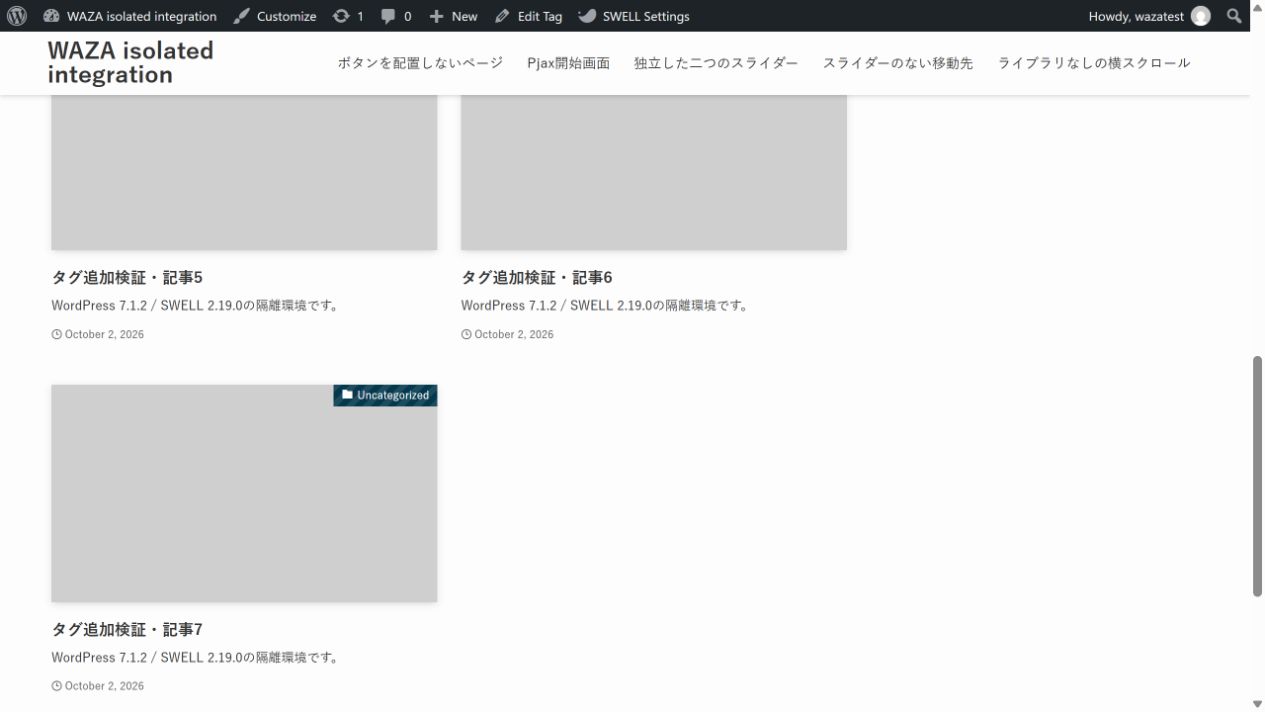
| タグ一覧・手動 | Enterで3件→6件→7件、最後にボタンを非表示 |
| タグ一覧・自動 | ボタンの位置までスクロールして6件、さらに進んで7件 |
| カテゴリー一覧 | 追加操作で3件→6件 |
SWELL 2.19.0のカテゴリー・タグ一覧では、記事リストが.p-termContentの中に出力されます。
掲載コードは、ボタン作成・手動追加・自動追加の取得先として.p-archiveContentと.p-termContentの両方に対応します。
自動版は手動版のmy_load_more_inline_jsを置き換えて使い、二つの同名関数を同時に有効にしません。
この例は公開記事の追加読込用です。取得する投稿は公開済みに限定し、表示形式・分類・ページ番号をコード内で絞り込みます。これはリクエスト数の制限ではありません。大量アクセス時の負荷や応答時間は別途確認してください。nonceを付けるだけで公開ページの取得を非公開にできるわけではありません。投稿や設定を書き換える処理へ流用する場合は、別途権限確認とnonceの検証が必要です。
2026年10月3日、隔離したWordPress 7.1.2 / SWELL 2.19.0で、通常投稿7件を同じタグに登録し、1ページの表示を3件にして確認しました。
手動・自動とも1〜7の記事が重複せずに並び、最終ページを追加した後はボタンが非表示になりました。
導入先でも記事件数、重複、最終ボタン、残したページ番号のリンクを確認します。
不具合が出た場合は追加したPHPを停止して通常のページ送りへ戻し、キャッシュ更新後の一覧で確認してください。
閲覧途中の投稿増減、最適化プラグイン併用、この修正後のスマホ操作は未検証です。
サムネイル型のタームでの追加表示は未確認です。追加分が1件も入らない場合は、その表示形式のパーツがli.p-postList__itemを先頭要素に出しているかを確認してください。
よくある質問:SWELLの記事一覧を「もっと見る」ボタン付き無限スクロールにする方法
この記事では、何を実装しますか?
記事では、SWELLで記事一覧に「もっと見る」ボタンを設置して、非同期で読み込む無限スクロール(Load Moreボタン型)を実装した手順をまとめています。テンプレートなどは上書きせず、JSを追加してカスタマイズしています。おまけとして、自動無限スクロールに変更するコードも載せています。
どのページが対象ですか?
記事では、通常の投稿のカテゴリー・タグアーカイブが対象で、カスタム分類は対象外です。表示設定の最大投稿数ずつ追加(検証例は3件)、ページネーションを残して失敗時も移動可能です。SWELL 2.19.0のカテゴリー・タグ一覧では記事リストが.p-termContentの中に出力され、掲載コードは.p-archiveContentと.p-termContentの両方に対応します。
表示件数は、どこで変えますか?
「設定 → 表示設定 → 1ページに表示する最大投稿数」で変更します。検証では3件にしましたが、本番では希望する件数を指定できます。記事では、この設定は他の一覧にも影響するため、投稿一覧ページやカテゴリー・タグのアーカイブ、検索結果の件数を変えたくない場合は、先に現在の値を記録してください。追加取得の件数もこの最大投稿数に合わせます。
コードは、どこに追加しますか?
有効な子テーマのfunctions.phpをバックアップして追加するか、Code Snippetsへ登録します。記事では、どちらか一方だけに追加し、親テーマは編集しません。
自動の無限スクロールにも、できますか?
記事では、my_load_more_inline_js関数とそのadd_actionだけを、記事の組み合わせへ置き換えます。同名関数を両方登録しないでください。ボタンは手動でも操作できます。別のコードでメインクエリの件数・並び順・対象投稿を変えているサイトには、このまま適用しないでください。
最後のページまで読み込んだら、どうなりますか?
記事では、隔離環境で通常投稿7件を同じタグに登録し、1ページの表示を3件にして確認しました。手動・自動とも1〜7の記事が重複せずに並び、最終ページを追加した後はボタンが非表示になりました。導入先でも記事件数、重複、最終ボタン、残したページ番号のリンクを確認します。
不具合が出たときや、検証の範囲は?
追加したPHPを停止して通常のページ送りへ戻し、キャッシュ更新後の一覧で確認します。元へ戻すときは追加した関数とフックを削除(またはスニペットを無効化)し、表示件数を変更した場合は元の値に戻します。記事では、閲覧途中の投稿増減、最適化プラグイン併用、この修正後のスマホ操作は未検証です。この例は公開記事の追加読込用で、nonceを付けるだけで公開ページの取得を非公開にできるわけではありません。確認は2026年10月のWordPress 7.1.2/SWELL 2.19.0の隔離環境で、最新は公式で確認してください。