

この例は1ページに1個だけ配置します。テーマ共通のswellVarsを上書きせず、対象を#waza-latest-postsに限定します。自動再生は無効です。各断片と「全functions.phpまとめ」は、どちらか一方だけ登録してください。戻すときは追加PHP・CSSとショートコードを外します。
オウンドメディアでは、メインビジュアルの所が新着記事になっているタイプをよく見ますよね?
SWELLの標準メインビジュアルとは別に、公開済みの通常投稿を新しい順に取得して表示するスライダーを作ります。
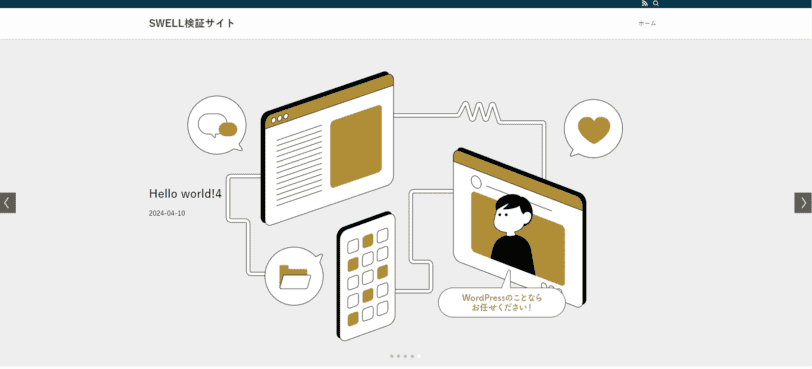
1.5枚表示した応用例
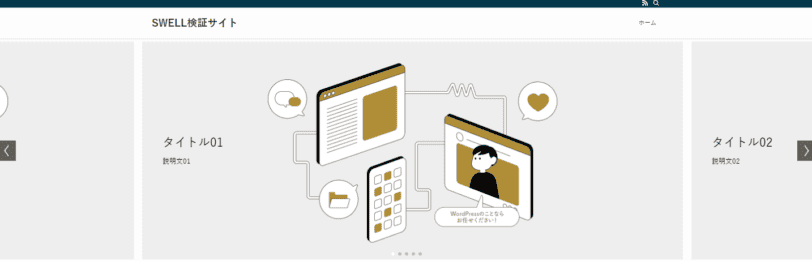
メインビジュアル用新着記事スライダーのメリットは以下の通りです。
- 新着記事をメインビジュアルで表示できる
- ページ生成時に新しい記事を取得する。ページキャッシュがある場合は更新が必要
- 取得する記事数をPHPで指定できる(掲載コードは5件)
- コードベースなので別の条件の記事を表示するカスタマイズもできる
- ショートコードベースで別の場所でも表示できる
それでは早速、このメインビジュアル用新着記事スライダーのカスタマイズを紹介します。


メインビジュアル用新着記事スライダーのカスタマイズ
有効なSWELL子テーマのfunctions.php、またはPHPスニペット管理プラグインの一方にコードを登録し、ショートコードで配置します。親テーマを直接編集せず、検証環境で動作を確認してください。
SWELLの画像・スライダー用資産を読み込み、画像領域の高さ270px、ボタンの大きさとフォーカス枠は掲載コードのCSSで補います。画像はobject-fit:coverで中央を切り出します。
またこのカスタマイズはコード化しているので、さらに好きな条件で表示できるカスタマイズ性もあるので便利です。
SWELLの事前設定
カスタマイズを開きましょう。
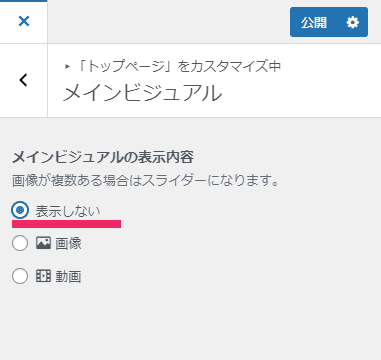
メインビジュアルのカスタマイズ設定
トップページ > メインビジュアルを表示しないにチェックを入れます。
手動で設定するメインビジュアルは使いません
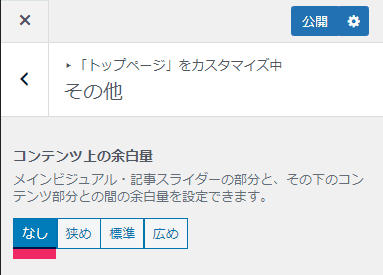
メインビジュアル下の余白設定
トップページ > その他からコンテンツ上の余白量をなしにします。
サイト全体設定のNO IMAGE画像
アイキャッチ画像を表示しますが、設定がない場合を考慮してNO IMAGE画像を設置しておきましょう。

トップページ用の固定記事の設定
トップページ用の記事を作成します。
フルワイドブロックの設置
フルワイドのブロックを設置してフルワイドにします。
上下の余白量も0にしておきましょう。
これであとで設置するメインビジュアルスライダーが画面いっぱいに表示されます。
ショートコードの設置
最後にショートコードを設置します。
これを表示するコードは後述します。
[latest_posts_slider]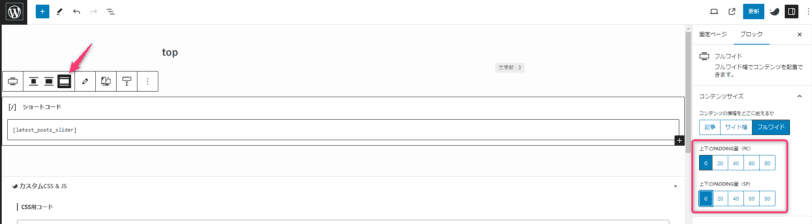
Swiperまわりのコードの読み込み
最後にメインビジュアル用新着記事スライダーをfunctions.phpに設置します。
最初に個々の解説を入れますが、最後にまとめたコードも紹介しています。
Swiperとメインビジュアルに必要なコードの読み込み
まずは以下をfunctions.phpに記述
SwiperとメインビジュアルのCSSといった必要なコードの読み込みます。
function motoki_swiper() {
    wp_enqueue_script('swell_swiper');
    wp_enqueue_style('swell_swiper');
    wp_enqueue_style('swell-main-visual-slider', get_template_directory_uri() . '/build/css/modules/parts/main-visual--slider.css', array(), '2.10.0');
}
add_action('wp_enqueue_scripts', 'motoki_swiper');
SwiperアニメーションのJSを設置
Swiperの初期化処理です。
このスライダー専用の設定値を定義しています。テーマ共通のswellVarsは変更しません。
自動再生は無効なので、配列のmvSlideDelayはこの初期化処理では使いません。
SWELL 2.19.0の保存ソースに同梱されるSwiper 7.0.6を前提に確認しています。別バージョンへ更新した場合は資産ハンドル・ファイル位置・APIを再確認してください。
function motoki_mv_animation() {
    // SwellVarsのJavaScript変数を定義
    $swell_vars = array(
        'mvSlideEffect' => 'slide',
        'mvSlideSpeed' => 1500,
        'mvSlideDelay' => 5000,
        'mvSlideNum' => 1,
        'mvSlideNumSp' => 1
    );

    echo '<script type="text/javascript">';
    echo 'var wazaLatestVars = ' . json_encode($swell_vars) . ';';
    echo <<< EOM
function wazaInitLatestPosts() {
    var root = document.querySelector('#waza-latest-posts .swiper');
    if (!root || root.swiper || typeof Swiper === 'undefined' || root.querySelectorAll('.swiper-slide').length < 2) return;
    var swiper = new Swiper(root, {
        loop: false,
        autoplay: false,
        speed: window.matchMedia("(prefers-reduced-motion: reduce)").matches ? 0 : wazaLatestVars.mvSlideSpeed,
        effect: wazaLatestVars.mvSlideEffect,
		centeredSlides: true,
        slidesPerView: wazaLatestVars.mvSlideNumSp,
        breakpoints: {
            960: {
				spaceBetween: 20,
                slidesPerView:  wazaLatestVars.mvSlideNum
            }
        },
        navigation: {
            nextEl: root.querySelector('.swiper-button-next'),
            prevEl: root.querySelector('.swiper-button-prev'),
        },
        a11y: {prevSlideMessage: "前の記事へ", nextSlideMessage: "次の記事へ"},
        pagination: {
            el: root.querySelector('.swiper-pagination'),
            clickable: true,
        },
    });
    root.addEventListener('focusin', function (event) {
        var slide = event.target.closest('.swiper-slide');
        if (!slide || !root.contains(slide)) return;
        swiper.slideTo(Array.from(root.querySelectorAll('.swiper-slide')).indexOf(slide), 0);
    });
}
if (document.readyState === "loading") document.addEventListener("DOMContentLoaded", wazaInitLatestPosts, {once:true});
else wazaInitLatestPosts();
</script>
<style>#waza-latest-posts .swiper,#waza-latest-posts .swiper-wrapper {height:auto;}
#waza-latest-posts .swiper-slide {height:auto;min-height:270px;position:relative;}
#waza-latest-posts .p-mainVisual__imgLayer {position:relative;inset:auto;height:auto;display:block;}
#waza-latest-posts .p-mainVisual__img {display:block;width:100%;height:270px;object-fit:cover;}
#waza-latest-posts .swiper-button-prev,#waza-latest-posts .swiper-button-next {width:44px;height:44px;border:0;border-radius:50%;background:#fff;color:#24507a;cursor:pointer;}
#waza-latest-posts button:focus-visible,#waza-latest-posts a:focus-visible {outline:3px solid #24507a;outline-offset:3px;}
#waza-latest-posts .swiper-button-disabled {opacity:.35;cursor:default;}
#waza-latest-posts .p-mainVisual__slideTitle {display:block!important;background:rgba(255,255,255,.92);padding:.5em;max-width:calc(100% - 100px);font-size:clamp(16px,2vw,24px);line-height:1.5;color:#24507a;}
</style>
EOM;
}
add_action('wp_footer', 'motoki_mv_animation', 100);
取得する記事情報のデータ
'numberposts' => 5,から最新記事5記事を取得するようにしてます。
アイキャッチ画像がない時はno imageから参照するようにしています。
function get_latest_posts_data() {
    $args = array(
        'numberposts' => 5,
        'post_status' => 'publish',
    );
    $recent_posts = wp_get_recent_posts($args);
    $posts_data = array();

    foreach ($recent_posts as $post) {
        $thumbnail_url = get_the_post_thumbnail_url( $post['ID'], 'full' );
        if ( ! $thumbnail_url ) {
            $thumbnail_url = SWELL_Theme::get_noimg( 'url' );
        }
        $thumbnail_url = esc_url( $thumbnail_url );

        $post_data = array(
            'title' => $post['post_title'],
            'date' => get_the_date('Y-m-d', $post['ID']),
            'url' => get_permalink($post['ID']),
            'image_url' => $thumbnail_url,
        );
        array_push($posts_data, $post_data);
    }

    return $posts_data;
}
メインビジュアル用新着記事スライダーのHTML
こちらをショートコード[latest_posts_slider]で表示しています。
もしさらに見た目を変えたときは、SWELLのメインビジュアルを見比べながら変更するか、CSSを書いてください。
function display_latest_posts_slider() {
    $posts_data = get_latest_posts_data();
    if (!$posts_data) return '<p>公開済みの記事がありません。</p>';
    ob_start();
    ?>
    <div id="waza-latest-posts" class="p-mainVisual -type-slider -height-img">
        <div class="p-mainVisual__inner swiper">
            <div class="swiper-wrapper">
                <?php foreach ($posts_data as $index => $post) : ?>
                <div class="p-mainVisual__slide swiper-slide c-filterLayer -nofilter" role="group" aria-label="<?php echo ($index + 1); ?> / <?php echo count($posts_data); ?>" data-swiper-slide-index="<?php echo $index; ?>">
                    <picture class="p-mainVisual__imgLayer c-filterLayer__img">
                        <?php if ( $post['image_url'] ) : ?>
                        <img width="1920" height="774" src="<?php echo esc_url($post['image_url']); ?>" alt="<?php echo esc_attr($post['title']); ?>" class="p-mainVisual__img" sizes="(max-width: 1920px) 100vw, 1920px" decoding="async">
                        <?php else : ?>
                        <span aria-hidden="true" style="display:block;min-height:260px;background:#eee;"></span>
                        <?php endif; ?>
                    </picture>
                    <div class="p-mainVisual__textLayer l-parent l-container u-ta-l" style="color:#000000;text-shadow:1px 1px 0px rgba(255, 255, 255, 0.2 );">
                        <div class="p-mainVisual__slideTitle"><?php echo esc_html($post['title']); ?></div>
                        <div class="p-mainVisual__slideText"><?php echo esc_html($post['date']); ?></div>
                        <a href="<?php echo esc_url($post['url']); ?>" class="p-mainVisual__slideLink" aria-label="<?php echo esc_attr($post['title']); ?>"></a>
                    </div>
                </div>
                <?php endforeach; ?>
            </div>
            <?php if (count($posts_data) > 1) : ?>
            <div class="swiper-pagination swiper-pagination-clickable swiper-pagination-bullets swiper-pagination-horizontal"></div>
            <button type="button" class="swiper-button-prev" aria-label="前の記事へ"></button>
            <button type="button" class="swiper-button-next" aria-label="次の記事へ"></button>
            <?php endif; ?>
        </div>
    </div>
    <?php
    return ob_get_clean();
}

add_shortcode('latest_posts_slider', 'display_latest_posts_slider');
全functions.phpまとめ
以下は前述の4つの処理をまとめたコードです。
まとめて使う場合は、先に登録した断片を削除してから、PHP開始タグを重ねずに追加します。サイト全体で資産を読み込む簡略例のため、使わないページでもCSSとJavaScriptが読み込まれます。
function motoki_swiper() {
    wp_enqueue_script('swell_swiper');
    wp_enqueue_style('swell_swiper');
    wp_enqueue_style('swell-main-visual-slider', get_template_directory_uri() . '/build/css/modules/parts/main-visual--slider.css', array(), '2.10.0');
}
add_action('wp_enqueue_scripts', 'motoki_swiper');

function motoki_mv_animation() {
    // SwellVarsのJavaScript変数を定義
    $swell_vars = array(
        'mvSlideEffect' => 'slide',
        'mvSlideSpeed' => 1500,
        'mvSlideDelay' => 5000,
        'mvSlideNum' => 1,
        'mvSlideNumSp' => 1
    );

    echo '<script type="text/javascript">';
    echo 'var wazaLatestVars = ' . json_encode($swell_vars) . ';';
    echo <<< EOM
function wazaInitLatestPosts() {
    var root = document.querySelector('#waza-latest-posts .swiper');
    if (!root || root.swiper || typeof Swiper === 'undefined' || root.querySelectorAll('.swiper-slide').length < 2) return;
    var swiper = new Swiper(root, {
        loop: false,
        autoplay: false,
        speed: window.matchMedia("(prefers-reduced-motion: reduce)").matches ? 0 : wazaLatestVars.mvSlideSpeed,
        effect: wazaLatestVars.mvSlideEffect,
		centeredSlides: true,
        slidesPerView: wazaLatestVars.mvSlideNumSp,
        breakpoints: {
            960: {
				spaceBetween: 20,
                slidesPerView:  wazaLatestVars.mvSlideNum
            }
        },
        navigation: {
            nextEl: root.querySelector('.swiper-button-next'),
            prevEl: root.querySelector('.swiper-button-prev'),
        },
        a11y: {prevSlideMessage: "前の記事へ", nextSlideMessage: "次の記事へ"},
        pagination: {
            el: root.querySelector('.swiper-pagination'),
            clickable: true,
        },
    });
    root.addEventListener('focusin', function (event) {
        var slide = event.target.closest('.swiper-slide');
        if (!slide || !root.contains(slide)) return;
        swiper.slideTo(Array.from(root.querySelectorAll('.swiper-slide')).indexOf(slide), 0);
    });
}
if (document.readyState === "loading") document.addEventListener("DOMContentLoaded", wazaInitLatestPosts, {once:true});
else wazaInitLatestPosts();
</script>
<style>#waza-latest-posts .swiper,#waza-latest-posts .swiper-wrapper {height:auto;}
#waza-latest-posts .swiper-slide {height:auto;min-height:270px;position:relative;}
#waza-latest-posts .p-mainVisual__imgLayer {position:relative;inset:auto;height:auto;display:block;}
#waza-latest-posts .p-mainVisual__img {display:block;width:100%;height:270px;object-fit:cover;}
#waza-latest-posts .swiper-button-prev,#waza-latest-posts .swiper-button-next {width:44px;height:44px;border:0;border-radius:50%;background:#fff;color:#24507a;cursor:pointer;}
#waza-latest-posts button:focus-visible,#waza-latest-posts a:focus-visible {outline:3px solid #24507a;outline-offset:3px;}
#waza-latest-posts .swiper-button-disabled {opacity:.35;cursor:default;}
#waza-latest-posts .p-mainVisual__slideTitle {display:block!important;background:rgba(255,255,255,.92);padding:.5em;max-width:calc(100% - 100px);font-size:clamp(16px,2vw,24px);line-height:1.5;color:#24507a;}
</style>
EOM;
}
add_action('wp_footer', 'motoki_mv_animation', 100);

function get_latest_posts_data() {
    $args = array(
        'numberposts' => 5,
        'post_status' => 'publish',
    );
    $recent_posts = wp_get_recent_posts($args);
    $posts_data = array();

    foreach ($recent_posts as $post) {
        $thumbnail_url = get_the_post_thumbnail_url( $post['ID'], 'full' );
        if ( ! $thumbnail_url ) {
            $thumbnail_url = SWELL_Theme::get_noimg( 'url' );
        }
        $thumbnail_url = esc_url( $thumbnail_url );

        $post_data = array(
            'title' => $post['post_title'],
            'date' => get_the_date('Y-m-d', $post['ID']),
            'url' => get_permalink($post['ID']),
            'image_url' => $thumbnail_url,
        );
        array_push($posts_data, $post_data);
    }

    return $posts_data;
}

function display_latest_posts_slider() {
    $posts_data = get_latest_posts_data();
    if (!$posts_data) return '<p>公開済みの記事がありません。</p>';
    ob_start();
    ?>
    <div id="waza-latest-posts" class="p-mainVisual -type-slider -height-img">
        <div class="p-mainVisual__inner swiper">
            <div class="swiper-wrapper">
                <?php foreach ($posts_data as $index => $post) : ?>
                <div class="p-mainVisual__slide swiper-slide c-filterLayer -nofilter" role="group" aria-label="<?php echo ($index + 1); ?> / <?php echo count($posts_data); ?>" data-swiper-slide-index="<?php echo $index; ?>">
                    <picture class="p-mainVisual__imgLayer c-filterLayer__img">
                        <?php if ( $post['image_url'] ) : ?>
                        <img width="1920" height="774" src="<?php echo esc_url($post['image_url']); ?>" alt="<?php echo esc_attr($post['title']); ?>" class="p-mainVisual__img" sizes="(max-width: 1920px) 100vw, 1920px" decoding="async">
                        <?php else : ?>
                        <span aria-hidden="true" style="display:block;min-height:260px;background:#eee;"></span>
                        <?php endif; ?>
                    </picture>
                    <div class="p-mainVisual__textLayer l-parent l-container u-ta-l" style="color:#000000;text-shadow:1px 1px 0px rgba(255, 255, 255, 0.2 );">
                        <div class="p-mainVisual__slideTitle"><?php echo esc_html($post['title']); ?></div>
                        <div class="p-mainVisual__slideText"><?php echo esc_html($post['date']); ?></div>
                        <a href="<?php echo esc_url($post['url']); ?>" class="p-mainVisual__slideLink" aria-label="<?php echo esc_attr($post['title']); ?>"></a>
                    </div>
                </div>
                <?php endforeach; ?>
            </div>
            <?php if (count($posts_data) > 1) : ?>
            <div class="swiper-pagination swiper-pagination-clickable swiper-pagination-bullets swiper-pagination-horizontal"></div>
            <button type="button" class="swiper-button-prev" aria-label="前の記事へ"></button>
            <button type="button" class="swiper-button-next" aria-label="次の記事へ"></button>
            <?php endif; ?>
        </div>
    </div>
    <?php
    return ob_get_clean();
}

add_shortcode('latest_posts_slider', 'display_latest_posts_slider');
以上です。
最後に確認しましょう。
公開済み投稿が5件以上なら新しい順に最大5件になること、0件では案内だけ、1件では操作ボタンが出ないことを確認します。画像なし・長いタイトル・PCとスマホ幅も比較し、前後ボタンと記事リンクをTab・Enter・Spaceで操作してください。キャッシュ利用時は更新後の記事が反映されることも確認します。
補足
いろいろ補足です。
サイトによってアイキャッチ画像のサイズ等違うので、調整が必要な場合があります。
CSSが分かる人は調整。
わからない人はご依頼ください(有償です)
アイキャッチ画像のサイズが正方形に近い場合
標準のcoverは画像領域を埋めるため、縦横比が違う画像の端を切り出します。
#waza-latest-posts .p-mainVisual__imgLayer {
    transform: none;
    animation: none;
}

#waza-latest-posts .p-mainVisual__imgLayer .p-mainVisual__img {
    width: 100%;
    height: 270px;
    object-fit: contain;
}
画像全体を表示したい場合は、上のCSSを追加CSSか子テーマのstyle.cssへ保存します。
containでは縦横比によって余白が生じ、画像領域の高さは270pxのままです。
SWELLの画像拡大用クラスを設置用HTMLから外し、追加CSSでも画像レイヤーの拡大とアニメーションを止めています。
画像レイヤーのクラスまで指定することで、後から出力される掲載PHPの標準CSSより優先させます。
スライドを1.5枚表示する
PCで隣の記事を半分見せる場合は、既存のmotoki_mv_animation関数内の設定配列を次に置き換えます。
これはPHPの置換部分で、追加JavaScriptとして別に登録するコードではありません。
mvSlideNumを1.5、mvSlideNumSpを1にすると、掲載JavaScriptが960px以上では1.5枚、960px未満では1枚を指定します。
    // このスライダー用の設定を変更
    $swell_vars = array(
        'mvSlideEffect' => 'slide',
        'mvSlideSpeed' => 1500,
        'mvSlideDelay' => 5000,
        'mvSlideNum' => 1.5,
        'mvSlideNumSp' => 1
    );
基本的なSwiperのパラメーター
SWELL標準スライダーとの競合を避け、この例の#waza-latest-postsだけを初期化します。
まとめ
今回オウンドメディア用のメインビジュアルの自動化として自作してみましたが、
いろいろとさらにカスタマイズの余地もあり、非常に便利です。
是非、活用してみてください。
この記事で紹介しているコードは、GitHubのMOTOKI-LLC/WAZA-codeにもまとめています。
前後ボタンを操作する見本
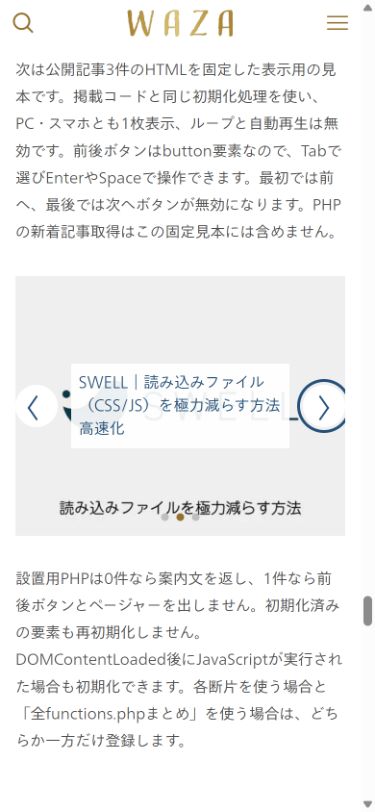
次は公開記事3件のHTMLを固定した表示用の見本です。掲載コードと同じ初期化処理を使い、PC・スマホとも1枚表示、ループと自動再生は無効です。前後ボタンはbutton要素なので、Tabで選びEnterやSpaceで操作できます。最初では前へ、最後では次へボタンが無効になります。PHPの新着記事取得はこの固定見本には含めません。



設置用PHPは0件なら案内文を返し、1件なら前後ボタンとページャーを出しません。初期化済みの要素も再初期化しません。DOMContentLoaded後にJavaScriptが実行された場合も初期化できます。各断片を使う場合と「全functions.phpまとめ」を使う場合は、どちらか一方だけ登録します。
公開画面での確認
スマホ幅390pxで、固定した公開記事3件の見本を操作した画面です。画像領域は270px高で、記事タイトルと次へボタンのフォーカス枠が表示されています。
PHPの出力条件を確認する
2026年10月2日、WordPress 7.1.2・SWELL 2.19.0で掲載した全PHPを実行しました。公開済み記事0件では案内だけ、1件では前後ボタンとページ送りを出さず、2件では日本語ラベルのボタンを出します。取得件数の上限は新しい順に5件で、アイキャッチ未設定時はSWELLの代替画像URLを使います。この確認には専用の検証投稿を使っており、公開見本の固定3件を新着取得の結果と数えていません。
よくある質問:SWELLのメインビジュアル用新着記事スライダーを設置するとき
このスライダーは、SWELLのメインビジュアルとどう違いますか?
公開済みの通常投稿を新しい順に最大5件取得します。SWELLのHTMLクラスと資産を利用しますが、画像高270px・自動再生なしなど独自設定があります。標準メインビジュアルと同じ設定になるわけではなく、ページキャッシュがあれば記事更新の反映も確認します。
どうやって設置しますか?
記事では、基本的にはfunctions.phpでコードを設定して、ショートコードで配置します。トップページ用の記事を作成し、フルワイドのブロックを設置して上下の余白量も0にしたうえで、ショートコードを設置します。
functions.phpに書くのが不安なときは、どうしますか?
子テーマのfunctions.phpかCode Snippetsの一方で管理します。どちらも検証環境で試し、追加箇所を元に戻せるようにします。各断片と「全functions.phpまとめ」は、どちらか一方だけ登録してください。
1ページに何個まで置けますか?
記事では、この例は1ページに1個だけ配置します。テーマ共通のswellVarsを上書きせず、対象を#waza-latest-postsに限定します。SWELL標準スライダーとの競合を避け、この例の#waza-latest-postsだけを初期化します。
アイキャッチ画像がない記事は、どうなりますか?
記事では、アイキャッチ画像がない時はno imageから参照するようにしています。サイトによってアイキャッチ画像のサイズ等が違うので、調整が必要な場合があります。画像はobject-fit:coverで中央を切り出すため、画像全体を表示したい場合はCSSを調整します。
記事数が少ないときは、どう表示されますか?
記事では、2026年10月2日にWordPress 7.1.2・SWELL 2.19.0で掲載した全PHPを実行し、公開済み記事0件では案内だけ、1件では前後ボタンとページ送りを出さず、2件では日本語ラベルのボタンを出すことを確認しています。取得件数の上限は新しい順に5件です。
自動再生はしますか?
記事では、自動再生は無効です。前後ボタンはbutton要素なので、Tabで選びEnterやSpaceで操作できます。記事末尾の見本はPC・スマホとも1枚表示で、ループと自動再生は無効です。
元に戻したいときは、どうしますか?
記事では、追加PHP・CSSとショートコードを外します。